Next.js vs React: One of the biggest decision dilemmas developers and engineering teams face when starting a new web project. React and Next.js are two cornerstones of modern frontend development, but they have different functions.
React is a JavaScript library that provides the building blocks for creating dynamic, interactive user interfaces. Next.js, built on top of React, is a full-stack framework that extends it with server-side rendering (SSR), static site generation (SSG), built-in routing, and automatic performance optimizations.
So should you use React on its own, or go with the added structure of Next.js? In this article, we break down the key differences between Next.js and React, the pros and cons of each, and help you decide which fits your tech stack and project goals in 2026.
Next.js vs React at a Glance
Here’s a quick side-by-side overview of how Next.js and React compare across the categories that matter most when choosing between them:
| Feature | React | Next.js |
|---|---|---|
| Type | JavaScript library | Full-stack framework (built on React) |
| Rendering | Client-side rendering (CSR) | SSR, SSG, ISR, CSR — all supported |
| Routing | Requires React Router or similar library | Built-in file-based routing |
| SEO | Requires additional configuration for SSR/SSG | Strong SEO out of the box via SSR and SSG |
| Performance | Manual code-splitting and optimization | Automatic code-splitting, image optimization, prefetching |
| API Support | No built-in backend; needs separate API layer | Built-in API Routes and Server Actions |
| Bundler | Webpack, Vite, or other (manual setup) | Turbopack (stable, default since Next.js 16) |
| Learning Curve | Moderate | Moderate to steep (adds SSR, ISR, file-based routing concepts) |
| Best For | SPAs, dashboards, internal tools, UI libraries | Content-heavy sites, e-commerce, SEO-critical apps, full-stack projects |
| Community | Massive — 55M+ websites, 20M+ developers | Large and growing — backed by Vercel, used by Netflix, Shopify, Uber |
Now, let’s dive deeper into what each technology offers and how they differ across six critical areas.
What Is Next.js?
Next.js is an open-source framework used to create web applications. It focuses on enabling server-side rendering (SSR), static site generation (SSG), and hybrid rendering.
The framework also offers an easy-to-use routing system, making it simple to handle different page views and URLs.
Why Use Next.js?
For some, the framework can be considered as the specialized version of React, tailored for specific use cases. Next.js enhances React by focusing on server-side rendering for faster page loads, improved SEO, and better user experience. It supports static site generation for efficient content delivery, offers simplified routing for complex applications, and includes TypeScript for safer code. Next.js also allows flexible deployment options, optimizes images automatically, and implements code splitting to boost performance, making it a powerful framework for specific development needs.
When to Use NextJS?
What are the practical uses of NextJS? For what type of projects is the framework a good option?
Here are practical causes why Next.js is commonly used:
- E-commerce platforms – It enables SSR or SSG for product listings, search results, and product detail pages. It also allows easy integration with popular e-commerce platforms and APIs.
- Content-heavy websites and blogs – NextJS is suitable for building content-focused websites and blogs due to its SSG capabilities that ensure fast loading and optimal SEO.
- Single-page applications (SPAs) – You can use Next.js’s hybrid rendering approach, combining server-side rendering and client-side rendering, to achieve the best of both worlds.
- Company websites and portfolios – It allows the easy creation of static pages while offering the flexibility to add dynamic sections or server-side rendered components as needed.
- Real-time dashboards – Next.js, in combination with technologies like WebSockets or server-sent events, can be used to build real-time dashboards.
- Hybrid mobile applications – By leveraging Next.js for the web portion of the application and sharing code between web and mobile platforms, you can streamline development and deliver consistent experiences across different devices.
Practical Uses of Next.js
From building server-rendered React applications to developing progressive web applications, Next.js has different uses. These are the most common with real examples of brands that used the framework for their product/platform:
| Use Case | Example |
| Server-rendered React applications | Netflix |
| Static websites with dynamic functionalities | GitHub |
| Jamstack applications | Notion |
| E-commerce platforms | Shopify |
| Blogs, content-heavy websites, news portals | The New York Times |
| SEO-friendly websites and applications | Airbnb |
| Progressive web applications (PWAs) | Twitter Lite |
| Scalable and high-performance applications | Uber |
| Single-page applications (SPAs) | Twitch |
| Enterprise-level applications | Verizon Media |
What is React?
React is one of the most popular open-source JavaScript libraries used for building user interfaces (UIs) for web applications.
Developed by Facebook, React focuses on creating reusable UI components that can efficiently update and render when the application´s data changes. Its component-based architecture allows developers to build complex UIs by composing smaller, reusable components.
React uses a virtual DOM (Document Object Model) for efficient rendering and provides a declarative syntax that makes it easier to manage the application state and handle UI updates.
Why Use React?
React’s popularity as the top front-end tool, used by over 82% of developers surveyed in State of JS 2022, is maintained by its component-based architecture for reusable UIs, efficient virtual DOM for performance, declarative syntax for code clarity, and one-way data flow for stability. React Native extends its capabilities to mobile app development, while JSX syntax integrates HTML with JavaScript seamlessly. React hooks further enhance functionality, allowing for state and lifecycle features in functional components, solidifying its first-place standing since 2016.
When to Use React?
React is a versatile library used for many different types of projects. These are its more popular uses:
- Single-page applications (SPAs) – React is often used to build SPAs where the application runs entirely in the browser.
- User interfaces for web applications – React’s component-based architecture and reusable UI components make it ideal for developing complex user interfaces.
- Mobile applications – React Native, a framework based on React, allows developers to build native mobile applications for iOS and Android platforms using JavaScript.
- Progressive web applications (PWAs) – React is a popular choice for building PWAs, which are web applications that provide an app-like experience with offline support, push notifications, and native-like performance.
- Real-time collaboration tools – React’s ability to handle real-time updates and its efficient virtual DOM diffing algorithm makes it suitable for building real-time collaboration tools.
- Interactive data-driven interfaces – React’s ability to efficiently manage and update the user interface based on changing data makes it a good choice for data-driven applications.
- Component libraries and UI frameworks – React’s component-based architecture makes it an excellent choice for creating reusable components and building component libraries.
- Integration with existing websites or applications – React can be integrated into existing websites or applications without requiring a full rewrite.
Practical Uses of React
What makes React powerful is its versatility in terms of uses. From mobile to enterprise-level applications, there are many practical uses that come from the library. Here are some real examples of the companies that work with React developers:
| Use Case | Companies |
| Single Page Applications | Facebook, Instagram, WhatsApp |
| Social Media Platforms | Facebook, Instagram, Twitter, Pinterest |
| E-commerce Websites | Amazon, Walmart, Alibaba, Flipkart |
| Financial Applications | PayPal, American Express, Intuit, Coinbase |
| Streaming Services | Netflix, Hulu, Disney+ |
| Travel and Booking Platforms | Expedia, Booking.com, TripAdvisor |
| Collaboration Tools | Slack, Trello, Asana, Microsoft Teams |
| News and Media Platforms | BBC, CNN, BuzzFeed |
6 Key Differences Between Next.js vs. React
1. Performance
In terms of performance, Next.js takes the lead as it provides additional optimization that enhances the performance of web applications compared to React alone.
As Next.js has built-in support for server-side rendering SSR, it can improve the initial page load time and provide better-perceived performance in content-heavy websites. React on its own. It focuses mostly on client-side rendering, where the initial HTML is minimal, and the bulk of rendering work is done on the client’s browser.
Additionally, Next.js automatically performs code splitting, breaking down the JS code into smaller chunks that are loaded on demand. This automatically speeds the initial page loads as only the necessary code is loaded. React, by itself, doesn’t provide these optimizations out of the box.
Another key feature of Nextjs in terms of performance is its built-in support for static site generation, where the HTML pages are generated at build time. This translates into fast page loads as the pre-rendered HTML can be served directly from a CDN without JS execution. React does not have native support for SSG, although developers can use third-party tools like Gatsby.
React uses client-side navigation, which results in faster subsequent page transitions, as only the necessary components are re-rendered. Nextjs supports both the client and server side, which gives more flexibility in choosing the appropriate navigation strategy based on your application needs.
Here are two examples that showcase the Next js vs. React SSR and CSR differences:
Client-side Rendering (CSR) in React:
import React from 'react';

const Counter = () => {

const [count, setCount] = React.useState(0);

const incrementCount = () => {

setCount(count + 1);

};

return (

<div>

<p>Count: {count}</p>

<button onClick={incrementCount}>Increment</button>

</div>

);

};

export default Counter;
As seen above, the Counter component uses React’s useState hook to manage the count state. The count is updated in the client’s browser, and the UI is re-rendered accordingly whenever the user clicks the “increment” button.
Server-side Rendering (SSR) in Next.js:
import React from 'react';

const Counter = () => {

const [count, setCount] = React.useState(0);

const incrementCount = () => {

setCount(count + 1);

};

return (

<div>

<p>Count: {count}</p>

<button onClick={incrementCount}>Increment</button>

</div>

);

};

export default Counter;
In Next.js´s code, the Counter component is the same as the React example. But, with Next. jsm, this component can be rendered on the server and sent to the client as pre-rendered HTML. This server-side rendering allows the user to see the initial HTML with the current count value without waiting for JS to execute and render the component on the client side. As a result, there´s improvement in the initial page load time and enhanced performance.
💡Interesting read: Best Javascript Frameworks: Which Ones to Use in 2023?
2. Seo
In terms of SEO (Search Engine Optimization), both Next.js and React can be optimized for search engines. However, Next.js has some built-in advantages that make it easier to achieve results. Here´s a breakdown of how it works in both NextJS and React.
Next.js:
Next.js has strong support for SEO out of the box, mostly due to its server-side rendering capabilities. With it, the framework can generate and serve fully rendered HTML pages to search engine crawlers that ensure that search engineers understand and index the content (this is fundamental to improving the discoverability of websites in search engine results).
Additionally, Next.js also allows you to customize data such as:
- Page titles
- Meta description
- Open graph tags
How does this help SEO? By managing these metadata elements, you can optimize how your website appears in search engine result pages (SERPs) and social media when your pages are shared.
React:
Although React does not provide built-in-server-side rendering capabilities, it’s still possible to achieve good SEO results.
A common approach is using isomorphic rendering, also known as hybrid rendered, where server sider endearing is selectively applied to specific pages or components. This allows you to generate server-rendered HMTL for pages or content that need better SEO visibility.
3. Router
Next.js and React Router are used to handle Routers in React applications, but they have different purposes and distinct features.
In the case of Next.js, it provides a built-in routing solution that means that you don’t require the use of any additional library like React router. Next.js offers both client-side and server-side routing, allowing you to handle routing logic on the server or client.
The framework also supports dynamic routing that enables the creation of dynamic URLs with parameters. Next.JS’s routing features are tightly integrated into the framework, making it convenient to handle routing in the context of a Next.js application.
React Router, on the other hand, is a standalone library specifically designed to handle routing in Rect applications. It’s not a complete framework like NextJS, but it’s a flexible and powerful routing solution. It offers a declarative approach to routing and provides features and components suitable for different scenarios.
Furthermore, React Router allows you to define routes, handle navigation, and pass parameter URLs. It also supports both client-side routings with browser history and server-side rendering with StaticRouter or Browser Router components.
Other features provided by React Router are nested routes, route, guarding, and URL parameter parsing, which gives React developers full control over the application’s routing behavior.
Still, trying to decide when to use Next.js vs. React Router?
| Next.js Router | React Router |
| Excellent choice when you need a full-stack framework with built-in routing, server-side rendering, and optimizations like code splitting and prefetching | Great option if you´re already using React and need a standalone option with flexible features. |
| Well-suited for building server-side applications or static websites where performance and SEO are relevant factors. | Suitable for client-side routing in single-page applications or when you need full control of your application´s routing behavior. |
💡 Might interest you: Svelt vs. React: 6 Key Differences to Know
4. Typescript
NextJS and React can both be used with TypeScript. Here´s how they differ in terms of TypeScript integration.
NextJS with Typescript:
Next.js provides excellent support for TypeScript out of the box. Its project setup includes built-in Typescript support that allows you to write Next.js applications using TypeScript from the start.
The framework also includes TypeScript types for its API routes, server-side rendering (SSR), and other specific features that make it easy to build Next.js applications with type safety.
When using Next.js with TypeScript, you can create TypeScript-based pages, API routes and components. Next.js automatically recognizes the file extensions like .tsx and .ts, enabling you to write JSX/TSX syntax and define types for props, state, and other entities within your Next.js components.
React with TypeScript:
React has solid support for TypeScript and provides type definitions for its core library. When using React with TypeScript, you can define types for your components, props, state, and other entities, which helps catch type errors during development and improves code and maintainability.
TypeScript allows you to enforce type safety and provides better tooling within your React projects, such as autocompletion and static analysis.
To use React with TypeScript, you need to install the required TypeScript packages and configure the TypeScript compiler in your project. Once set up, you can start writing React components using TypeScript syntax, define prop types using interfaces or types, and benefit from the additional type checking and documentation provided by TypeScript.
5. Popularity
Both NextJS and React are widely used in the development community. However, they have distinct levels of popularity.
React has gained significant popularity, and according to Github, it is stated by far the most popular front-end framework/library. It is also more “wanted” than most frameworks and libraries.
The library has been widely adopted by major companies, including Instagram, Airbnb and Netflix, which has contributed to its widespread popularity.
NextJS has gained more visibility in recent years, and some developers have even called it “React´s killer,” but data still shows that React is still far away from being overthrown. The reason is simple: it has numerous features and flexibility that can be combined with a wide range of other technologies.
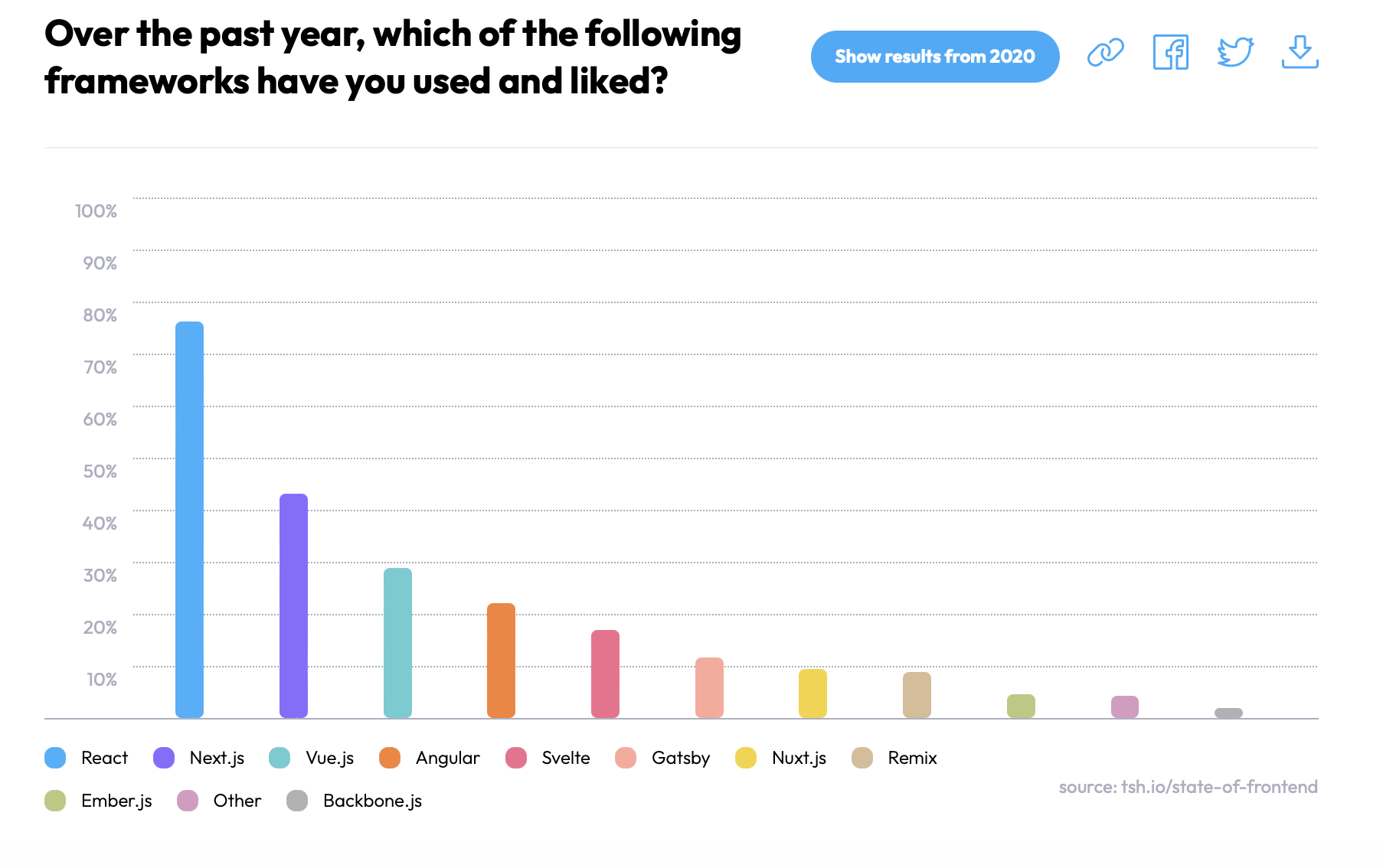
According to the State of Frontend report, React is the most used and liked framework (76.2%) and NextJS is in second place with 43.1%.
6. Documentation
When comparing the documentation for Next.js and React, both frameworks have comprehensive resources available online.
Next has a well-documented website that is a useful resource for developers. It covers various topics, including installation, setup, routing, data fetching, styling, and more. It also provides detailed explanations with code examples and usage guidelines for each feature and API offered by NextJS.
The NextJS documentation includes tutorials and guides users to understand how to build specific types of applications or implement common functionality.
React´s documentation is considered one of the best in the web development community. It covers everything developers need to know to learn React starting from the beginner level to more advanced topics.
Besides providing clear explanations and code examples, the documentation includes interactive playgrounds that allow developers to experiment and understand more about React´s concepts and APIs.
Pros and Cons of Each Framework
Each technology has a core strength that makes it popular and widely used, but it also has certain disadvantages to keep in mind. Let´s go over NextJS and React´s pros and cons.
Advantages of NextJS
| Server-side rendering (SSR) | NextJS´s server side rendering allows pages to be pre-rendered on the server and delivered as fully rendered HTML to the client, resulting in faster initial page loads and better SEO performance. |
| Static site generation (SSG) | Next.js supports static site generation, enabling you to generate static HTML files at build time. This improves performance and simplifies content delivery by serving static files. |
| Optimized performance | NextJS´s server-side rendering allows pages to be pre-rendered on the server and delivered as fully rendered HTML to the client, resulting in faster initial page loads and better SEO performance. |
| API routes | Next.js allows you to create serverless API routes within your application that provide a backend-like functionality. |
| Vercel deployment integration | With a single command, you can deploy your Next.js application to Vercel, providing an easy deployment process. |
| Fast refresh (hot reloading) | Next.js supports fast refresh, also known as hot reloading, which allows you to see immediate changes in your code without losing the application’s state. |
Disadvantages of NextJS
| Limited flexibility compared to React | Next.js imposes certain conventions and patterns, which may limit flexibility compared to using React directly. |
| Complex to build | Next.js introduces additional complexities in build and deployment configurations compared to a standard React application. |
| Dependency on Node.js | Next.js relies on Node.js as its runtime environment, which may be a consideration if you have specific infrastructure constraints or if your team is not familiar with Node.js. |
| Compatibility issues with certain libraries and packages | Due to the server-side rendering nature of Next.js, some libraries or packages may not be fully compatible or require special handling to work correctly. |
| Increased complexity for smaller projects | Next.js might introduce unnecessary complexity for smaller projects that don’t require server-side rendering or static site generation. In such cases, a simpler React setup may be more suitable. |
| Potential for longer build times | Next.js applications can have longer build times, especially when dealing with large codebases or complex build configurations. |
Advantages of ReactJS
| Component-based architecture | ReactJS component based architecture allows you to build reusable UI components that enhance code reusability and maintainability. |
| Virtual DOM | ReactJS utilizes a virtual DOM, which is a lightweight copy of the actual DOM. It allows React to efficiently update and render only the necessary parts of the UI, resulting in improved performance and user experience. |
| Unidirectional data flow | ReactJS enforces a unidirectional data flow, which means data flows in a single direction from parent components to child components. |
| Community-driven updates and improvements | ReactJS is backed by a large and active community, which ensures continuous updates, improvements, and bug fixes. |
| Testability | ReactJS promotes testability by encouraging the separation of concerns through component architecture. With tools like Jest and React Testing Library, you can easily write unit tests and integration tests for your React components. |
| React Native | ReactJS serves as the foundation for React Native, a framework for building cross-platform mobile applications. With React Native, you can reuse your ReactJS skills and codebase to develop native-like mobile apps for iOS and Android. |
Disadvantages of ReactJS
| Steeper learning curve for beginners | ReactJS has a steeper learning curve, especially for beginners who are new to concepts like JSX syntax, component-based architecture, and state management. |
| Boilerplate code | ReactJS requires writing more code compared to other frameworks, which can result in increased boilerplate code. |
| Integration challenges with legacy systems | Integrating ReactJS into existing legacy systems may pose challenges due to conflicts with other libraries or frameworks. |
| Limited built-in UI components | ReactJS provides a limited number of built-in UI components compared to some UI frameworks. |
| Tooling and setup complexity | Setting up a ReactJS project may involve configuring build tools, bundlers, and transpilers. |
| JavaScript-centric approach | ReactJS primarily focuses on JavaScript, which may pose challenges for developers coming from different programming backgrounds, such as those experienced in HTML or CSS. A |
Next.js vs React in 2026: What’s Changed
The Next.js vs React comparison looks significantly different in 2026 than it did just a year ago. Both technologies have gone through some of their most significant transformations.
Next.js 16: Turbopack, Cache Components, and a New Routing Model
Next.js 16, released in October 2025, is the most performance-focused release since the App Router launched. The headline change is that Turbopack — Vercel’s Rust-based bundler — is now stable and the default for both development and production builds. No configuration is required.
The release also introduced Cache Components, a new programming model that replaces the previous implicit caching behavior. Developers now have explicit, opt-in control over what gets cached using the 'use cache' directive — a major improvement for applications that mix static and dynamic content on the same page. This builds on Partial Pre-rendering (PPR), allowing you to serve a static shell instantly from a CDN while streaming dynamic content to fill it in.
Other notable changes in Next.js 16 include the replacement of middleware.ts with proxy.ts for clearer network boundary handling, Next.js DevTools MCP for AI-assisted debugging, and an overhauled routing system with layout deduplication that reduces redundant network transfers during prefetching. The follow-up Next.js 16.1 release (December 2025) stabilized Turbopack’s file system caching for development and added an experimental Bundle Analyzer.
React 19 and 19.2: Server Components, Actions API, and the React Compiler
On the React side, React 19 (December 2024) brought some of the most significant changes since React Hooks. Server Components are now fully stable, letting developers render components on the server to reduce client-side JavaScript and improve initial load times. The new Actions API simplifies how applications handle data mutations.
The experimental React Compiler automates performance optimization by handling memoization that developers previously managed manually with useMemo and useCallback. Next.js 16 ships with stable React Compiler support built in, making the two technologies even more tightly integrated.
React 19.2 (October 2025) continued the momentum with the <Activity /> component for pre-rendering hidden parts of an app, useEffectEvent for cleaner event handling, and Partial Pre-rendering for combining static and dynamic rendering on the server.
The React Foundation: Independent Governance
In a landmark move, React and React Native transitioned to the React Foundation under the Linux Foundation in early 2026. Eight Platinum founding members — Amazon, Callstack, Expo, Huawei, Meta, Microsoft, Software Mansion, and Vercel — now back the project, with Meta committing over $3 million in funding and five years of dedicated engineering support. Technical decisions remain independent from the foundation’s board, governed by React’s maintainers and contributors.
For teams evaluating Next.js vs React for long-term projects, this transition signals that React is no longer tied to any single company’s priorities. It’s vendor-neutral infrastructure backed by the broader industry.
What This Means for the Next.js vs React Decision
The gap between Next.js and React isn’t shrinking, it’s clarifying. React remains the foundational library for building component-driven UIs, and it’s more powerful than ever with Server Components and the Actions API. But the React team now officially recommends starting new projects with a framework like Next.js rather than using React standalone.
Next.js 16, in turn, has evolved into a true full-stack platform, with Turbopack, Cache Components, Server Actions, and built-in React Compiler support, it offers a production-ready environment that handles rendering, routing, caching, and bundling out of the box.
The practical takeaway: if you’re building a new project in 2026 and need SEO, performance, or server-side capabilities, Next.js is the default starting point. If you’re building a highly customized SPA, an internal dashboard, or a UI component library where you want full control over every architectural decision, React on its own still gives you the flexibility to do exactly that.
Next.js vs React: Which Should You Choose?
The choice between Next.js and React comes down to what your project demands. React gives you a flexible, lightweight foundation for building any kind of user interface — from single-page applications and interactive dashboards to reusable component libraries. Next.js takes that foundation and adds the structure, performance optimizations, and server-side capabilities needed for production-ready, SEO-friendly web applications.
In 2026, the two aren’t competitors; they’re complementary. Every Next.js application is a React application. The real question is whether your project benefits from Next.js’s built-in routing, rendering options, and Turbopack-powered build pipeline, or whether React’s unopinionated architecture gives you the control you need.
Here’s a simple rule of thumb: if your project is content-heavy, needs strong SEO, or involves a mix of static and dynamic rendering, start with Next.js. If you’re building an internal tool, a widget, or a client-side app where you want to pick your own routing, bundling, and state management solutions, React on its own is the right call.
Whichever direction you choose, getting the right developers on your team makes all the difference. If you’re looking to hire React developers or a Next.js developer who can ship production-quality code from day one, DistantJob specializes in finding senior-level remote talent that fits your tech stack, your team culture, and your timeline.
FAQ
It depends on your project’s needs. React is more flexible and works well for SPAs, internal tools, and UI component libraries. Next.js is the better choice for content-heavy websites, e-commerce platforms, and any project where SEO and server-side rendering are priorities. Since Next.js is built on React, many teams use both together.
Use Next.js when you need server-side rendering (SSR), static site generation (SSG), or incremental static regeneration (ISR) for improved performance and SEO. It’s also the better option when you want built-in routing, automatic code-splitting, and image optimization without configuring them manually.
No. Next.js is built on top of React — it extends React’s capabilities rather than replacing them. Every Next.js component is a React component. However, the React team does now recommend using a framework like Next.js for new projects rather than using React standalone with manual tooling.
Yes. React can be used on its own with bundlers like Vite or as part of other frameworks. This approach gives you more flexibility and control over your project architecture. It’s ideal for SPAs, dashboards, embedded widgets, or applications where SEO and server-side rendering aren’t critical.