Continuous Integration (CI) and Continuous Delivery/Deployment (CD) are practices that provide great benefits for software development and deployment. CI/CD brings automation, reliability, and speed to the whole SDLC, enabling developers to release code more frequently, reliably, and with fewer errors.
In this article, we’ll explore the significance of CI/CD in software development and highlight how DevOps teams automate the entire process from integration to delivery along the CI/CD pipeline.
What is Continuous Integration (CI)
Continuous Integration (CI) is a software engineering practice where developers merge their code changes into a central main branch of the source repository. Then, the build pipeline (an automated build and testing process) immediately verifies the change. The main goal is to detect integration errors early and make the software ready for deployment more rapidly.
Continuous Integration was introduced as part of Kent Beck’s Extreme Programming in 1999, and its implementation is crucial to successful DevOps. Within Agile, Continuous Integration (CI) simplifies the resolution of issues found between newly written and old code, enabling quick bug fixing.
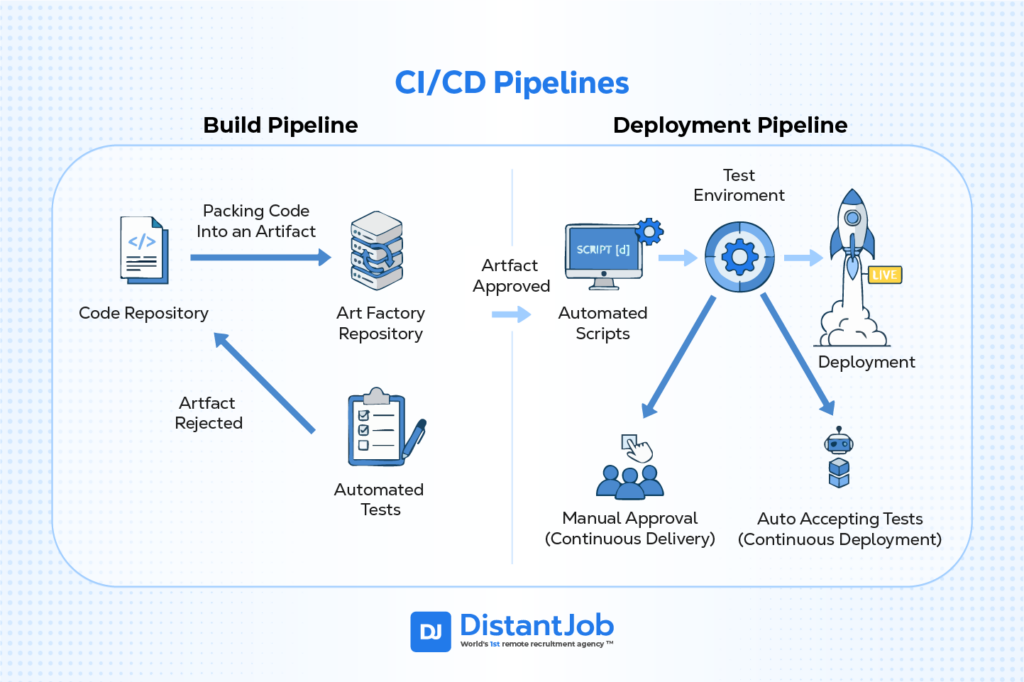
In short, the newly written code is packed into an artifact (an executable program made from the written code). This artifact is automatically tested inside the build pipeline. Once validated, it’s sent to deployment.
What is Continuous Delivery/Deployment (CD)
The next step in the CI/CD pipeline is Continuous Delivery or Continuous Deployment. Continuous Delivery means automated tests check every code change automatically for a release. The software is always in a deployable state, but a human must manually approve and trigger the final deployment to production.
Meanwhile, Continuous Deployment is Continuous Delivery taken to the next level. Every change that passes the automated pipeline, including all tests, is automatically deployed to production without any manual intervention. Only a failed test will prevent a release.
If the artifact coming from the Build Pipeline requires human inspection before going into production, this is a Continuous Delivery pipeline. If the artifact undergoes automated tests until it automatically goes into production, it’s Continuous Deployment.
CD (Delivery) vs CD (Deployment): When to Use Each
The decision between Continuous Delivery (CD) and Continuous Deployment (CD) depends on your company’s risk tolerance, regulatory needs, and development maturity.
Both are DevOps practices that extend Continuous Integration and focus on automating the release process. The critical difference is the presence of a manual approval step before deploying to production.
| Feature | Continuous Delivery (CDel) | Continuous Deployment (CDep) |
| Release to Production | Requires manual approval (human intervention). | Fully automated (no human approval needed). |
| Goal | Software is always ready to be deployed with the push of a button. | Software is automatically deployed to production once tests pass. |
| Risk | Lower, due to the final human safety gate. | Higher risk. It demands top-tier testing and monitoring to mitigate. |
| Control | High control over the timing of the release. | Minimal control over release timing; happens immediately. |
| Ideal For | Regulated industries, high-risk systems, coordinated releases. | Fast-paced startups, consumer web apps, rapid feature iteration. |
CI/CD Pipeline Stages
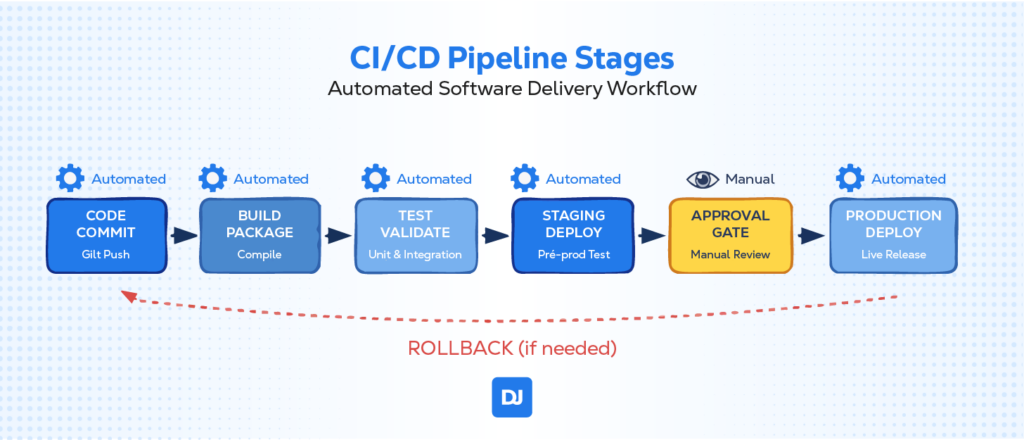
A CI/CD pipeline has several stages, including Source (code commit), Build (compiling code), Test (running automated checks), Staging Gate (Automated Scripts to ensure fit to the product environment), and Deploy (releasing the application to an environment). These stages work together to automate the software development lifecycle, from code change to release.
This fail-fast approach saves time, reduces risk, and ensures that only thoroughly tested, approved changes reach your users. Whether you’re building a simple web application or a complex distributed system, these core stages provide the foundation for reliable, continuous software delivery:
Stage 1: Code Commit & Version Control
The pipeline begins when developers push code changes to a version control system like Git. This stage establishes the foundation for all subsequent automation.
What happens:
- A developer commits code changes to a branch
- Version control system (Git, SVN) records the change
- Webhook or polling mechanism triggers the pipeline
- Code is tagged with version information and metadata
Common tools: Git, GitHub, GitLab, Bitbucket, Azure Repos
Stage 2: Build & Artifact Packaging
Once the developer commits code, the build stage compiles source code into executable artifacts and packages them for distribution.
What happens:
- Source code is compiled into binaries or bytecode
- Dependencies are resolved and included
- Configuration files are processed
- Artifacts are packaged (JAR, Docker images, executables)
- Build metadata and version numbers are applied
Common tools: Maven, Gradle, npm, Docker, Jenkins, GitHub Actions
Stage 3: Unit / Integration Tests
Testing ensures code quality and functionality before deployment. This stage runs various types of automated tests to catch bugs and regressions.
What happens:
- Unit tests verify that individual components work correctly
- Integration tests check that different parts work together
- Code coverage analysis measures test completeness
- Static code analysis identifies potential issues
- Security scans check for vulnerabilities
Common tools: JUnit, pytest, Jest, SonarQube, Selenium, Cypress
Stage 4: Deploy to Staging
The staging environment mimics production as closely as possible, allowing for final validation before live deployment.
What happens:
- Application is deployed to a production-like environment
- Database migrations are executed if needed
- Configuration is applied for the staging environment
- Health checks verify the deployment was successful
- End-to-end tests may run in this environment
Common tools: Kubernetes, Docker Swarm, AWS ECS, Ansible, Terraform
Stage 5: Staging Gate
Before production deployment, an artifact must be tested one final time to see if the release will work in the end-user environment. Some companies require human approval to ensure control over what goes live (for strategic releases or to ensure the pipelines work well). Whenever a strategy is not required and the pipelines are mature enough, continuous deployment ensures a seamless flow between coding and live release.
What happens:
- Pipeline pauses and waits for human intervention (Continuous Delivery only)
- Designated approvers (or automated tests) review changes and test results
- Business stakeholders may validate functionality (Continuous Delivery only)
- Risk assessment is performed for the deployment (Continuous Delivery only)
- Approval is granted, or deployment is rejected
Common tools: GitHub PRs, GitLab merge requests, Jira, ServiceNow, custom approval workflows
Stage 6: Deploy to Production
The final stage deploys the application to the live production environment, where end users can access it.
What happens:
- Application is deployed to production servers
- Traffic is gradually shifted to the new version (blue-green, canary)
- Monitoring systems track application health and performance
- Alerts notify teams of issues
- Rollback procedures are ready if problems occur
Common tools: Kubernetes, AWS ECS, Azure Container Instances, Load Balancers, Istio, Envoy
Popular CI/CD Pipeline Tools in 2025
CI/CD tools are becoming more and more intelligent and focused. They are no longer just about running automated tests and deployments. They are starting to incorporate AI capabilities, better integrate with the cloud infrastructure, and simplify complex workflows so that other employees can take control over processes.
Jenkins – The veteran that’s still powerful but showing its age
- Best for: Complex, highly customized projects that need maximum flexibility
- Reality check: High maintenance overhead, requires dedicated specialists
- When to choose: You have unique requirements that off-the-shelf tools can’t handle
GitHub Actions – The crowd favorite for good reason
- Best for: Teams already using GitHub who want simple, fast setup
- Why it works: Everything in one place – no switching between tools
- When to choose: You’re a small to medium team prioritizing developer experience
GitLab CI/CD – The enterprise all-in-one solution
- Best for: Large organizations needing security, compliance, and governance
- Trade-off: More expensive but includes everything from planning to monitoring
- When to choose: You need enterprise-grade features and unified toolchain
CircleCI – The speed demon with smart pricing
- Best for: Teams obsessed with fast builds and performance optimization
- Unique angle: Pay-per-use credits encourage efficient pipeline design
- When to choose: Build speed directly impacts your business velocity
Azure Pipelines – Microsoft’s ecosystem play
- Best for: Organizations already invested in Microsoft/Azure infrastructure
- 2025 focus: Heavy AI integration and security automation
- When to choose: You’re in the Microsoft ecosystem and want deep integration
AWS CodePipeline – Amazon’s cloud-native approach
- Best for: AWS-heavy organizations wanting seamless cloud integration
- Pricing shift: Moving to per-minute billing encourages lean, efficient pipelines
- When to choose: Your infrastructure lives primarily in AWS
Spacelift – The infrastructure specialist
- Best for: Teams managing complex Infrastructure as Code (IaC) deployments
- Standout feature: AI-powered troubleshooting specifically for infrastructure issues
- When to choose: Infrastructure management is a major pain point for your team
CI Advantages
A continuous integration (CI) pipeline yields more benefits than simply increasing the efficiency of an already-existing operation. The advantages of CI are:
1. Early Bug Detection
CI ensures that code release procedures are standardized across all projects along the CI/CD pipelines. It also facilitates additional testing in test environments before finally sending the code to production. The end product is a more stable codebase with fewer defects.
2. Improved Software Quality
Continuous integration (CI) is a reliable method for software engineers who want to write and test code. The deployment process along the CI pipeline is also standardized, resulting in high-quality software releases.
CD Advantages
Continuous Delivery offers many advantages to software development teams, such as process automation that guarantees:
1. Faster Release Rates
CD facilitates the DevOps team’s rapid and regular delivery of updates to clients. Implementing CI/CD increases the velocity of the team, including the deployment of code features and timely bug fixes.
2. Better User Feedback Loop
CD enables a better user feedback loop by releasing new features more quickly. The code deployment strategies in CD also allow you to test things and get feedback so you can determine what works and prioritize changes and enhancements.
Challenges in CI/CD Implementation and Where You Address Common Hurdles
Implementing a CI/CD pipeline comes with various challenges. Here’s a look at some of them and potential solutions to help you maximize the benefits of your CI/CD strategy:
Infrastructure Challenges
Scalability problems in CI/CD pipelines can result in significant delays if left unchecked. Sometimes, the pipeline’s infrastructure cannot shoulder the extra demands of your software projects with the expansion of the development team.
To be on the safer side, the current CI/CD pipeline’s infrastructure must always support the additional load. One solution to this challenge is to leverage cloud-based services that automatically scale in response to demand.
Integration Challenges
Integration issues in CI/CD pipelines are frequent and can delay software development. For example, agile development requires quick and frequent testing cycles. However, it can be challenging to incorporate testing into the workflow effectively.
One potential solution is to leverage an agile testing tool that works well with your workflow and to automate testing to deliver quick feedback.
Conclusion
CI/CD forms the foundation of a DevOps methodology for building and deploying software. By incorporating the code deployment methodologies mentioned above into your continuous integration and deployment (CI/CD) workflow, your DevOps teams may release software more quickly while retaining higher quality and dependability.
Besides, automation in software development affords you the much-desired competitive edge, faster time-to-market, and enhanced customer satisfaction. It also ensures easy collaborations while using the best practices of the best techniques and technologies in the industry.
If you’re looking to hire a DevOps engineer to help implement these practices, we can assist. Learn more about how our remote recruitment services can connect you with top DevOps talent tailored to your needs.
FAQ
GitHub Actions is often the quickest to adopt because it integrates natively with GitHub repos and uses straightforward YAML syntax. :contentReference[oaicite:1]{index=1}
Yes. Despite newer SaaS platforms, Jenkins remains popular thanks to 1,800+ plugins and full self-hosting control. Other alternatives include GitHub Actions, GitLab CI/CD, Azure Pipelines, and AWS CodePipeline. :contentReference[oaicite:2]{index=2}
Delivery always requires a manual “OK” before production; Deployment is 100 % automated after tests pass.
Absolutely—pipelines can build and publish monolith binaries or serverless artifacts—but containers simplify parity across stages.