Since 2020, the tech industry’s job market has undergone a radical transformation, and companies are seeking efficiency in a post-pandemic scenario. Many American companies have adopted the Remote-First or Hybrid model. However, they have discovered that running Scrum remote teams is not as easy as it seems at first glance.
This isn’t another generic “communication is key” article. Below is the tactical playbook we use internally and recommend to our clients.
The Remote Scrum Reality Check
According to the 17th Annual State of Agile Report (published by Digital.ai in 2024), 71% of surveyed companies use Agile in their software development lifecycle (SDLC). Scrum is the most widely adopted Agile framework. Their reports consistently show Scrum as the dominant framework, with the 16th and 17th reports indicating 63% to 87% of companies using it.
In the meantime, according to We Work Remotely’s State of Remote Work 2025, approximately 69% of companies in the United States offer some form of flexibility (hybrid or fully remote). This is an increase from 51% in 2024.
The math is simple: most development teams use Scrum, and most companies have remote workers. Yet the frameworks weren’t designed for each other. Here’s how to bridge that gap.
1. Standardize the Digital Office
For a remote developer, the selected stack is the office. If your communication is fragmented, your sprint will be too. Thus, documentation is key.
Single Source of Truth
Use a robust project management tool (Jira, Linear, or Asana) where every task has a clear description, “Definition of Ready,” and “Definition of Done.”
Don’t split work across multiple systems. The moment you have “some tasks in Jira, some in Notion, and some in Slack threads,” you’ve already lost.
Virtual Whiteboarding
Scrum thrives on visualization. Use tools like Miro or Mural for Sprint Planning and Retrospectives to mimic the post-it notes of a physical room. Screen-sharing a spreadsheet doesn’t cut it; your team needs to see the whole board and move things around collaboratively.
Synchronous vs. Asynchronous
Establish clear expectations for when people need to be “live” on Slack/Teams and when they should be in “deep work” mode.
The Handshake Agreement
Teams can create a Team Working Protocol specifically for remote norms (e.g., “We respond to Slack within 2 hours, but ‘Deep Work’ status is sacred”).
Write it down. Review it quarterly. Update it when things aren’t working.
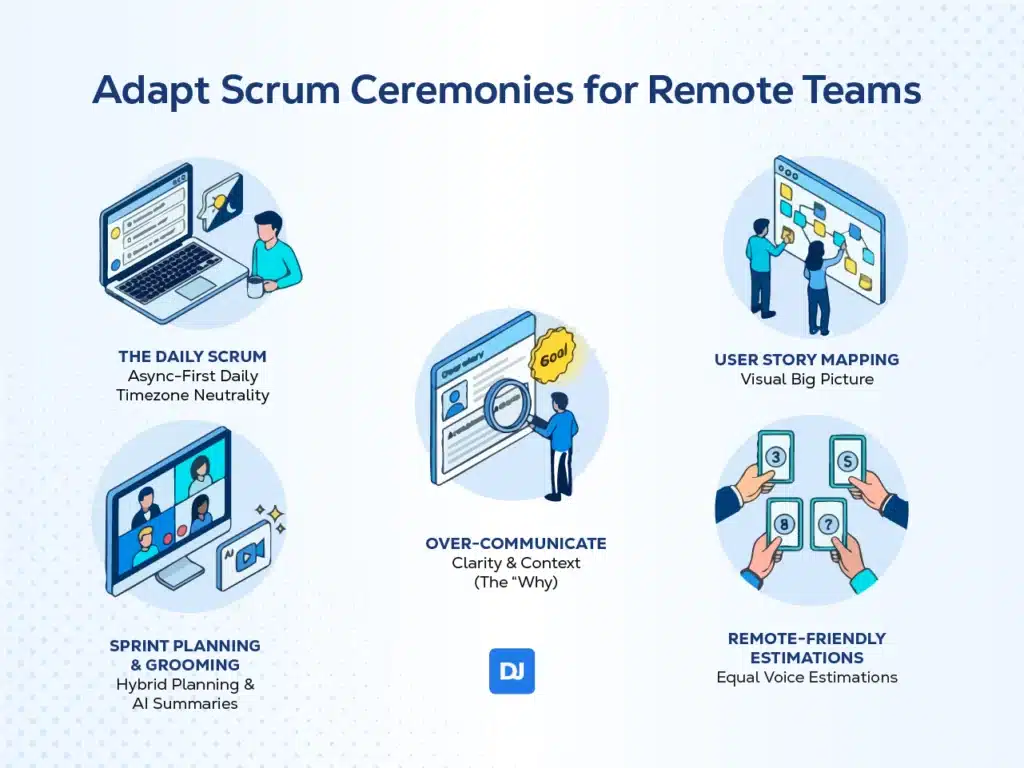
2. Adapt Scrum Ceremonies for Remote Teams
Distance can make ceremonies feel like just another meeting. To prevent this, you need to adapt the format for your Scrum remote team.
The Daily Scrum
In a remote setting, the Daily Scrum is the primary pulse check, but it doesn’t have to be synchronous.
- Async-First Daily: Instead of requiring meeting attendance, ask them to answer three questions at their best time (usually when they wake up).
- What did you do yesterday towards the project?
- What do you plan to do today towards the project?
- Do you have any blockers or impediments?
- Timezone Neutrality: If your team spans 8 time zones, asynchronous communication will be your best way to keep everyone engaged and reporting in.
Use a dedicated Slack channel, a tool like Geekbot or DailyBot, or even a simple shared document.
Sprint Planning & Grooming
Remote developers can feel “out of the loop” on product vision. During these ceremonies, it’s best to have them around online and even in person. However, while synchronous attendance is ideal, timezone overlaps don’t always allow it. If a developer cannot attend, ensure they provide input on the backlog before the session and review the AI-summarized recording immediately after.
Over-Communicate
Spend extra time on the why behind a User Story, not just the what. Moreover, don’t forget to add the Acceptance Criteria. If you feel the need, add Goals and Objectives to the User Story so everyone is on the same page.
User Story Mapping
In a remote setting, seeing the big picture visually in Miro helps a Scrum remote team to understand the application they are working with. Remember: they are software engineers, not ticket-takers. User Story Mapping allows developers to connect the Stories with their associated features and understand what they’re building and why.
Remote-Friendly Estimations
Use digital Planning Poker tools to ensure Scrum remote team members have an equal voice in sizing tasks. This prevents the loudest person from anchoring estimates and gives remote developers the same influence as those who happen to share a timezone with leadership.
3. Foster Radical Transparency
Information siloing is the silent killer of remote Scrum. To fight this, adopt a culture where everything is documented by default.
Record Everything
Record your Sprint Demos and technical deep-dives. This allows developers in different time zones to catch up without missing context. You can also use AI notekeepers as tl;dv to generate a document with the meetings’ main points.
Public Channels over DMs
Encourage technical discussions in public Slack channels. People will learn from each other, both the technical aspects and the company culture.
The exception is sensitive HR matters or personal issues; everything else should be public by default.
4. Prioritize Social Capital
Social capital is the value coming from social networks, relationships, and connections. It facilitates cooperation, trust, and mutual benefit among individuals or groups. Scrum relies on trust; trust is the essential, non-negotiable foundation of Scrum, enabling transparency, inspection, and adaptation. However, it’s hard to trust a name on a screen if you’ve never met them. So, build trust among your team members.
The Virtual Watercooler
Dedicate the first 5 minutes of meetings to non-work chat (don’t count these on the timebox). This special touch will make Scrum ceremonies easier to engage in.
Pair Programming
Encourage remote and in-office devs to pair up via VS Code Live Share or Tuple. Pair Programming is one of the fastest ways to transfer knowledge and build rapport.
Even one hour of pairing per week per developer compounds over time.
Explicit Praise
In a remote environment, small wins go unnoticed. Use the Retrospective to call out specific contributions from remote members.
Use Sprint Retrospectives to call out specific contributions from team members. Be concrete:
- ❌ “Good job, everyone.”
- ✅ “Sarah’s refactor of the auth module saved us 3 days on the current sprint.”
5. The Onboarding Blueprint
A remote developer’s first days dictate their long-term success. Onboarding is key to any company ensure their Scrum remote team is not just integrated into the work, but into the tribe.
| Phase | Goal | Technical Goal | Cultural Integration |
| Day 1 | Access to all tools, a Buddy assigned for quick questions, and a 1-on-1 with the Scrum Master. | Access to all tools & CI/CD pipelines. | Virtual “Coffee Chat” with a buddy or non-dev peer. |
| Week 1 | Small “Quick Win” tasks to get code into production and understand the CI/CD pipeline. | First PR merged (even if tiny). | 1-on-1 with the Product Owner to hear the Product Vision. |
| Month 1 | Full participation in all ceremonies and leading a small feature discussion. | Owns a small feature end-to-end. | Leads a segment of the Sprint Retrospective. |
Conclusion
Integrating remote developers into a Scrum remote team isn’t about replicating the office experience. You must evolve past it. To transform a distributed group into a unified force, documentation, asynchronicity, and social capital are your best tools.
Remember that when every developer (regardless of their zip code) has the same access to information and influence, the remote label disappears. What remains is a high-performance, productive team.
And we should know it. At DistantJob, we’ve helped companies integrate remote developers over the past decade into their existing Scrum teams, and learned what works (and what fails spectacularly). Do you need help with your remote Scrum team? Let me help you!
Frequently Asked Questions
Use async-first standups: each developer posts their update (yesterday’s progress, today’s plan, blockers) at the start of their workday in a dedicated channel. Reserve synchronous standups for teams within a 4-hour timezone spread who genuinely need real-time collaboration.
Follow a phased approach: Day 1 focuses on access and orientation, Week 1 targets their first merged PR and meeting the Product Owner, and Month 1 aims for full ceremony participation and owning a feature end-to-end. Assign a buddy from day one.
Three tactics: dedicate the first 5 minutes of meetings to non-work conversation, schedule regular pair programming sessions across the team, and use Retrospectives to explicitly recognize individual contributions.
At minimum: a project management tool (Jira, Linear, or Asana), a communication platform (Slack or Teams), a virtual whiteboard (Miro or Mural), and video conferencing. For async standups, consider Geekbot or DailyBot. For pair programming, VS Code Live Share or Tuple.
Yes, but it requires intentional adaptation. The ceremonies and principles remain the same; the implementation changes. Async communication, explicit documentation, and deliberate social connection become essential rather than optional.