A successful, fully remote business needs an infrastructure that goes far beyond “everyone has a laptop and a cellphone.” While a physical office provides a controlled environment, a remote-ready infrastructure must be intentionally engineered to be resilient, scalable, and secure across distributed locations.
You need to shift from managing places to managing systems and people.
It is divided into five critical layers: Physical, Digital, Security, Operational, and the so-called “Social Infrastructure.” In this article, we will examine these layers thoroughly.
1. Physical Infrastructure and Connectivity
Even without an office, the physical base still exists: it’s in each employee’s home. You have to choose if your company has a Bring Your Own Device (BYOD) policy or if every employee will use company-owned devices.
| Feature | BYOD (Bring Your Own Device) | Company Infrastructure Policy |
| Upfront Cost | Low; employees use their existing hardware. | High; requires bulk hardware purchases. |
| Security | Harder to control; relies on user habits. | High-standardized encryption and tools. |
| IT Support | Complex due to “fragmentation” (many brands). | Streamlined; IT knows the exact specs. |
| Employee Privacy | High; users own their personal data. | Low; the company has the right to monitor/wipe. |
| Compliance | Difficult for regulated industries (HIPAA/SOC2). | Ideal: provides a clear audit trail. |
| Onboarding | Fast; start immediately on Day 1. | Slower; requires shipping and provisioning. |
Bring Your Own Device Policy
The “infrastructure” is decentralized. Employees handle their own hardware refreshes. If a laptop breaks, the employee is often responsible for the fix, which can lead to downtime.
Security is often managed at the application level (using Mobile Application Management or MAM). You control the “work apps” but not the whole device. This is riskier if the employee uses unsecured public Wi-Fi or lacks an updated antivirus.
Is BYOD cheaper?
While BYOD looks cheaper on paper, it often carries hidden costs. What happens if a personal laptop is stolen? A BYOD policy needs clear legal language on who pays for the loss.
And when an employee leaves, it is much harder to ensure company data is deleted from a personal hard drive than it is to simply “remote wipe” a company laptop. In the end, BYOD is upfront cheaper, but it adds legal and security complexity.
Company Infrastructure Policy
The company manages the lifecycle. You decide when a device is too old (e.g., every 3 years) and push out a replacement. This ensures every remote worker has the “horsepower” needed to run company software efficiently.
Under this policy, you offer company notebooks with the same specifications to your employees. It makes remote maintenance easier and ensures everyone has the same performance.
Security is managed at the device level (using Mobile Device Management or MDM). You can enforce system-wide VPNs, block malicious websites, and push mandatory security patches automatically.
Hybrid Models (The Middle Ground)
Many modern remote companies use a CYOD (Choose Your Own Device) or COPE (Corporate-Owned, Personally Enabled) model.
- CYOD: You give employees a list of 3-4 pre-approved laptops (e.g., a specific MacBook or Dell XPS). The company buys it, but the employee feels they have a choice.
- COPE: The company owns the device but allows the employee to use it for personal tasks (Netflix, personal email), to keep them from carrying two phones or laptops.
2. The Digital Stack Ecosystem
In 2026, a remote-ready infrastructure doesn’t merely consider tools but integrated ecosystems. A company doesn’t “use Slack and Notion”; it lives in an ecosystem where these tools are virtually invisible because they are deeply interconnected.
Information is no longer “trapped” in a Notion page or a Slack thread. It exists in a shared data layer. For example, if a project deadline is updated in a specialized management tool, the change reflects instantly across the entire ecosystem without manual syncing.
Choosing your tools will impact your digital stack’s workflow, so pick those that interact seamlessly with each other.
To choose the ideal ecosystem, you shouldn’t just look at the features of each software, but at the level of friction between them. There are basically two paths: the “All-in-One” (ready-made suites) and the “Best-of-Breed” (best of each category integrated).
How to Choose the Best Digital Ecosystem
To decide, evaluate your company on these 4 pillars:
- Documentation Culture: Is your company based on writing (Asynchronous) or on meetings (Synchronous)?
- Digital Literacy: Is your team tech-savvy enough to manage multiple tools or do they prefer a single, familiar interface?
- Workflow Complexity: Do you need heavy automation (e.g., if X happens in software A, trigger Y in software B) or just a place to store files and communicate?
- Context Cost: How much time does your team waste jumping from one tab to another?
Example 1: The “Best-of-Breed” Ecosystem (Focused on Agility and Design)
Ideal for: Startups, digital agencies, software companies, and creative teams.
In this model, you choose the best tool on the market for each function and use the API as the glue.
- The Command Hub: Slack. Everything happens here.
- The Brain (Documentation): Notion. Centralizes manuals, OKRs, and wikis.
- The Engine (Projects): Jira (for development) or Basecamp(for business).
- The Memory (Files): Google Drive.
How do they become an ecosystem?
For example, you paste a Notion link into Slack, and it displays a rich preview with the project status.
A comment made in Notion is notified directly to the responsible person’s Slack.
When marking a task as “Completed” in Asana, a bot (via Zapier) sends a weekly summary of deliverables to the board’s Slack channel.
Advantage: You have the best tools in the world.
Challenge: Requires someone (or a consultancy) to set up the initial automations.
Example 2: The “All-in-One” Ecosystem (Focused on Security and Scale)
Ideal for: Traditional companies transitioning to remote work, large corporations, or regulated sectors (Finance/Healthcare).
Here, you use the Microsoft suite (365/Azure) or Google (Workspace) as the absolute base.
- The Command Hub: Microsoft Teams.
- The Brain: SharePoint / OneNote.
- The Engine: Microsoft Planner / Project.
- The Security: Azure Active Directory.
How do they become an ecosystem?
Integration between tools is native and invisible. You open an Excel file within a Teams video call, and everyone can edit simultaneously without leaving the window.
Security is unified. If you disable a user in Azure, they instantly lose access to everything, from email to chat and files.
The search is universal. Searching for “Client X Contract” in the Windows taskbar or Outlook brings up results from within SharePoint files.
Advantage: Everything comes in a single payment slip, and the learning curve is shorter for those already using Office.
Challenge: Individual tools (like Planner) may be less powerful than specialized tools (like Monday).
The verdict for your choice:
- If you want speed and user experience, go with Modular (Slack/Notion/Zapier).
- If you want total control, compliance (LGPD), and price, go with Microsoft 365.
3. Information Security (Zero Trust)
In a remote environment, security is not on the office wall, but on the user’s identity. For a remote-first company, a Zero Trust Architecture implements the principle of “never trust, always verify.” Access to systems must be continuously validated.
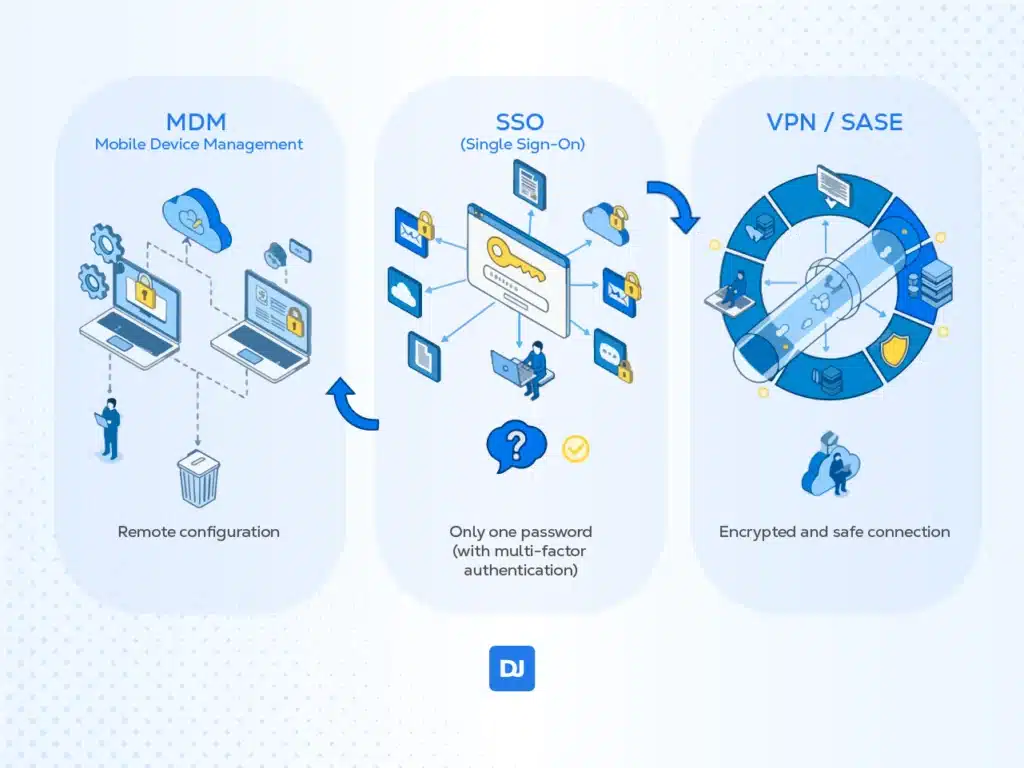
Mobile Device Management Software, such as Jamf or Kandji, allows IT personnel to remotely configure, update, and erase data from laptops in case of loss or theft. SSO Tools like Okta or Azure AD allow employees to use only one password (with multi-factor authentication) to access all tools.
When needed, Virtual Private Networks (VPN) and Secure Access Service Edge (SASE) ensure an encrypted and safe connection between data and employees.
4. Operational and Legal Infrastructure
To hire in different states or countries, the bureaucracy needs to be online. Infrastructure isn’t just software; it’s legal compliance. To hire globally without opening local branches, you need an Employer of Record structure. DistantJob allows you to hire and pay employees anywhere in the world while adhering to local laws, without needing to open a branch in each country. We have a fully EOR (Employer of Record) service.
You will also need a people management system to handle vacation, benefits, and performance evaluation 100% online. DistantJob also offers you all these services, so you can focus on your business.
5. Social Infrastructure and Processes
This is the invisible layer, but the most important one for preventing burnout and turnover. For a remote-first company, Social Infrastructure is what prevents your company from becoming just a collection of avatars exchanging messages. In a physical office, culture is transmitted by coffee breaks and hallway conversations; in a remote environment, culture needs to be designed and codified.
Handbook-First (The Company Bible)
In remote work, knowledge can’t reside solely in people’s heads, or you’ll have “DM chaos” (everyone asking the same thing privately all the time).
Build a central repository (at Notion or Confluence) containing everything from how to request reimbursement to how the company makes decisions.
Here is the Golden Rule: “If it’s not documented, it doesn’t exist.” If someone asks a question on Slack that should be in the Handbook, the answer should be the Handbook link (after it’s updated).
It drastically reduces new employee onboarding time and eliminates the need for meetings to answer basic questions.
For overly complex processes, like a special spreadsheet, it should have its own handbook as well.
Communication Protocols (Synchronous vs Asynchronous)
The biggest mistake companies make when trying to go remote is attempting to replicate the office in the digital world, making everything into a synchronous event that disturbs focused work and diminishes productivity.
Asynchronous communication is a remote-first standard. You send a message, and people will answer it when they have time. You don’t have to create a two-hour-long meeting to answer it.
Video conferences are an exception. Meetings should be used for: 1) solving complex problems; 2) creative brainstorming, and 3) emotional/social connection. Nothing else.
Outcomes, not by Outputs
Focus on what is delivered, not on how many hours the person spent with the “green” indicator lit in the chat.
Create clear and public goals for everyone. If the employee achieved the result, it doesn’t matter if they worked from 8 am to 5 pm or took afternoon breaks to pick up their children.
The company assumes the employee is professional. Micromanagement is the poison of remote work culture. If you don’t trust an employee, don’t hire them. Hire only when you trust.
Conclusion
Building a remote-ready infrastructure is an ongoing process of refinement, not a one-time setup. It requires a delicate balance between high-grade security, seamless digital integration, and a human-centric social layer.
You must move beyond “working from home” and into the realm of high-performance. Infrastructure is not a collection of tools, but rather the primary driver of their global competitive advantage.
Navigating the complexities of global hiring, local compliance, and operational scaling doesn’t have to be a solo journey. At DistantJob, we specialize in helping companies build this foundation by connecting you with world-class talent and managing the legal and operational heavy lifting.
Ready to solidify your remote-first foundation? Contact DistantJob today and let us help you scale your infrastructure with the right talent and global expertise.