Cloud costs don’t spiral due to bad luck; they spiral because nobody’s watching. Oversized compute resources, unmanaged storage backups, ill-planned data transfers, and forgotten idle infrastructure all raise the bill. AWS cost optimization is the best way to manage resource allocation, architecture decisions, and spend visibility at the same time, without a bill that creeps up fast.
Flexera estimates that 29% of cloud spend is wasted on resources nobody uses, instances sized for traffic that never shows up, and AI inference jobs nobody bothers to tune.
According to Senior Cloud Solutions Architect and DevOps Engineer Wesley Lopes, the best way to optimize cost in AWS is by following the FinOps pillars, to rightsize overprovisioned resources, terminate orphan resources, use Spot instances on demand, and adopt Saving Plans (1 to 3 years) for workflows that will be utilized in the following years. He also recommends checking regions where your resources could be cheaper.
Fixing this doesn’t mean throttling your applications or risking downtime. It is entirely possible to slash your AWS footprint by 20% to 30% while actually improving system reliability. The secret is deploying a framework that treats cost as a core performance metric.
What is AWS Cost Optimization?
According to the AWS Well-Architected Framework, AWS cost optimization is “a continual process of refinement and improvement over the span of a workload’s lifecycle. The practices in this paper help you build and operate cost-aware workloads that achieve business outcomes while minimizing costs and allowing your organization to maximize its return on investment.”
AWS Cost Optimization at a Glance
Studies from Belhaven University show the state of AWS Cost Optimization worldwide:
- Savings with Reserved Instances: Using 1 to 3-year commitments for Reserved Instances and Savings Plans can reduce costs by up to 72% compared to on-demand.
- Spot Instances: For interruptible workloads, using AWS Spot Instances can cut costs by more than 60%.
- Storage Optimization: You can automatically move unused data to lower-cost tiers (using S3 Intelligent-Tiering), resulting in a 40% reduction in storage-related expenses in the Discovery Channel case study.
- AI and ML-based Automation: Using analytics and AI-driven automation for both workload scaling and allocation cuts costs on AWS by up to 18%.
- Public Cloud Optimization Overview: Overall, strategic management and automation of public cloud resources prevent over-provisioning and can generate ongoing savings of 15% to 30%.
4 Primary Cloud Cost Drivers on AWS
You can’t fix what you can’t find. Before you can trim your bill with AWS cost optimization, you need to know where the money is actually going. In most accounts, the waste hides in four places.
1. Compute Resources
AWS Compute is usually the first line item on the bill. Team size instances for the workload they imagine they’ll have, not the one they actually run, so they end up with more memory and CPU than anything ever touched.
AWS doesn’t care whether you use that capacity. A virtual machine sitting at 10% utilization costs the same as one running flat out at 90%. You’re paying full price either way.
2. Unmanaged Storage Accumulation
Storage costs don’t spike, they creep. Automated backup policies that nobody prunes make backups pile up. EBS volumes stay attached to nothing after the instance that used them gets terminated. Previous file versions sit around long after anyone needs them.
None of this looks alarming on any single day. But without a lifecycle policy that actually deletes or archives this stuff, it just keeps billing you month after month for data nobody will ever open again.
3. Cross-Boundary Data Transfers
AWS charges for moving data across regions and even between availability zones in the same region. Then, those fees add up fast once your architecture is chatty.
If your services are spread across multiple AZs and constantly talking to each other, every one of those calls carries a price tag. Design for that, or watch the data transfer line on your invoice grow for reasons nobody on the team can immediately explain.
4. Forgotten Idle Infrastructure
This is a classic one. Someone spins up a multi-AZ database for an afternoon load test, the test wraps up, the app servers get shut down, and the database gets left running. Nobody terminates it on purpose; it just slips off everyone’s radar.
Weeks later, it’s still there, still billing for storage, I/O, and that multi-AZ redundancy you only needed for a few hours, quietly draining budget for a test that finished a month ago.
Why AWS (and Cloud) Bills Grow Unexpectedly
Without AWS Cost Optimization best practices, the cloud is still infinitely scalable. Unfortunately, so will be your bill. AWS isn’t greedy; it creeps because idle, forgotten, and oversized resources are not constantly monitored by the humans who create them. Visibility turns those invisible pennies into glaring red flags.
| Trend/Metric | Key Statistic | Root Cause | Source |
| Cloud Waste Rising | 29% of public cloud spending is entirely wasted. | Complex cost models of new AI workloads. | Flexera 2026 State of Cloud |
| Forecasting Inaccuracy | Only 2% of CIOs spend less than projected. | 89% suffer from a lack of cloud cost visibility | CIO / CloudZero |
| Stifled Projects | 61% of IT leaders delay or cancel projects due to the bill. | Unexpected technology cost overruns. | Zylo FinOps Cost Optimization |
| AI Cost Priority | 98% of organizations now actively manage AI spend. | AI infrastructure is the fastest-growing required skillset. | FinOps Foundation State of FinOps 2026 Report |
10 Cost Optimization Strategies for Reclaiming Your AWS Budget
Cutting cloud costs isn’t one fix. It’s resource configuration, smarter purchasing, and someone actually watching the bill on an ongoing basis. Skip any one of those and the savings leak right back out.
| Strategy | Core Action | Key Tool / Benefit |
| 1. Execute Right-Sizing Policies | Match instances to actual workload utilization. | AWS Compute Optimizer identifies downsizing opportunities. |
| 2. Implement Infrastructure Elasticity | Scale compute capacity based on demand. | Turn off non-production environments after hours. |
| 3. Select Correct Pricing Model | Match workloads to optimal contract types. | Avoids expensive standard On-Demand pricing. |
| 4. Optimize Data Storage Tiers | Move older records to cheaper tiers. | Use Intelligent-Tiering or Glacier Deep Archive. |
| 5. Manage Non-S3 Storage Waste | Delete unattached EBS volumes and backups. | Automate using Amazon Data Lifecycle Manager. |
| 6. Minimize Infrastructure Network Waste | Remove empty ELBs and leverage CDNs. | Reduces flat hourly and bandwidth costs. |
| 7. Geographic Regional Differentiation | Compare regional pricing and compliance laws. | Evaluate locations via AWS Pricing Calculator. |
| 8. Financial Governance and Tagging | Tag resources by owner and project. | Enables accurate cost tracking and accountability. |
| 9. Manage Commitment Portfolios | Actively monitor and adjust RI commitments. | Sell unused RIs on AWS Marketplace. |
| 10. Autonomous AI-Driven Optimization | Automate right-sizing and predictive Spot rebalancing. | AI tools manage fast-moving cloud math. |
1. Execute Right-Sizing Policies
Right-sizing means matching the instance to the workload it actually runs, not the workload someone guessed it might run.
AWS Compute Optimizer looks at your real utilization history and tells you, in plain numbers, where you can drop to a smaller, cheaper instance type without putting performance at risk. Most teams are surprised by how often the answer is “yes, you can downsize this.”
2. Implement Automated Infrastructure Elasticity
Paying for fixed capacity around the clock makes sense for almost nothing. Most workloads have peaks and quiet stretches, and your infrastructure should follow that pattern rather than sitting flat at maximum capacity all day.
- Auto Scaling: Set rules that add or remove compute capacity based on what’s actually happening right now, CPU load, request volume, whatever metric reflects real demand.
- Resource Scheduling: Script your non-production environments to shut down nights, weekends, and holidays. Dev and staging environments don’t need to run while everyone’s asleep. Turning them off on schedule can cut their runtime by up to 70%.
3. Select the Correct Pricing Model
Running everything on standard pay-as-you-go pricing is the most expensive way to operate a stable AWS footprint, full stop. Once you know which workloads are predictable and which aren’t, matching each one to the right contract type unlocks real discounts.
| Pricing Model | Ideal Workload Type | Cost Benefit | Strategic Tradeoff |
| On-Demand | Unpredictable, short-term, or highly volatile applications | Maximum flexibility, no upfront commitment | Highest base cost per hour |
| Savings Plans | Consistent, baseline compute usage across instance families | Up to 72% discount vs. On-Demand | Requires a 1- or 3-year hourly spend commitment |
| Reserved Instances | Predictable, steady-state database or application workloads | Up to 72% discount for specific, static configurations | Locks you into specific instance attributes and regions |
| Spot Instances | Fault-tolerant background tasks like batch processing or rendering | Up to 90% savings using spare capacity | Low reliability, AWS can reclaim capacity with 2 minutes’ notice |
4. Optimize Data Storage Tiers
Not all your data deserves the same storage tier. New files need to be available instantly. Old records mostly just need to exist somewhere, cheaply, in case compliance ever comes calling. AWS has a tier for each of those realities, and most teams are paying premium rates for data that hasn’t been touched in years.
| Data Type and Access Pattern | Recommended Storage Class | Cost Structure | Performance Profile |
| Frequently accessed application assets and active websites | S3 Standard | Moderate storage fees, free retrievals | Millisecond access across 3+ availability zones |
| Data with unpredictable or changing access patterns | S3 Intelligent-Tiering | Automatic cost optimization, small management fee | Shifts between frequent and infrequent tiers automatically, no retrieval fees |
| Backup files and disaster recovery assets are accessed rarely | S3 Standard-Infrequent Access | Lower storage fee, variable retrieval charge | Millisecond access, minimum storage duration applies |
| Compliance records and long-term regulatory archives | S3 Glacier Deep Archive | Lowest storage cost on the platform | Retrieval can take up to 12 hours |
5. Non-S3 Storage Waste & Orphaned Backups (EBS)
When you terminate an EC2 instance, the EBS volumes attached to it don’t go with it. They stay. And they bill you every month.
Without an automated tool like Amazon Data Lifecycle Manager, you end up paying storage fees for backups of systems that got shut down months ago. Nobody leaves them on purpose. Nobody notices them either, until someone finally audits the inventory.
6. Infrastructure & Network Waste (Load Balancers & CDNs)
Elastic Load Balancers (ELBs) also incur flat hourly rates. If an ELB has no backend targets or handles virtually zero traffic, it’s pure waste.
Using a Content Delivery Network to cache web content at edge locations reduces bandwidth costs from EC2 to the web.
7. Geographic & Regional Cost Differentiation
AWS services are priced differently depending on the region you choose. A comprehensive strategy requires evaluating project locations not just by distance or latency, but by regional pricing variances and regional data sovereignty laws.
Before you create a workload somewhere, run the numbers in the AWS Pricing Calculator. Also, check your industry’s data sovereignty requirements, because compliance can force you into a pricier region whether you planned for it or not.
8. Financial Governance, Tagging, and Chargebacks
Without consistent tagging, your cost reports tell you how much you’re spending, but nothing else. No team attribution, no project breakdown, no way to figure out what caused last month’s spike or who owns it.
Four tags get you most of the way there:
| Tag | Purpose | Example |
| Owner | Team or person responsible | dev-team |
| Environment | Where it lives in the stack | production, staging, dev |
| Project | The product or service it belongs to | api-payments |
| CostCenter | Internal billing code | fin-402 |
Tag everything consistently from day one. Retrofitting this across an existing account is a miserable week you don’t want.
9. Active Management of Commitment Portfolios
Reserved Instances need someone actually watching them. Architecture shifts, and a standard RI that made sense a year ago might now be covering a workload that no longer exists. If that happens, sell it on the AWS RI Marketplace instead of letting it run out as dead money.
Convertible RIs give you more flexibility, but only if you use them. Leave them unmanaged, and they’ll quietly lock you into a configuration that costs more than On-Demand would today.
10. Autonomous Optimization & AI-Driven Tooling
Past a certain scale, the math moves faster than people can. That’s the actual argument for tools like Spot by NetApp, Finout, or nOps.
Automate at least these two things: Continuous right-sizing for both containers and Kubernetes, and Predictive Spot rebalancing. The last makes Spot viable for production. Instead of AWS’s two-minute termination notice and a scramble to recover, these platforms catch the signal up to an hour early, drain the instance, and swap in a replacement before anything breaks. That’s what flips Spot from a liability into a real cost strategy.
AWS Cost Optimization Tools
There is no cost optimization in AWS (or any cloud) without observability. You have to monitor your cloud usage and costs. Worry not! AWS Cost Optimization Hub, AWS Compute Optimizer, and AWS Cost Explorer are worthy tools, but you have so many more at your disposal.
1. AWS Cost Optimization Native Tools
AWS native tools cover most of the needs of AWS-only businesses. They are mostly free and are easy to implement (they are embedded). These tools manage the AWS environment and are updated in real time with new services. If your infrastructure is 100% (or mostly 100%) AWS or your team is focused on AWS, use them to avoid additional licensing costs.
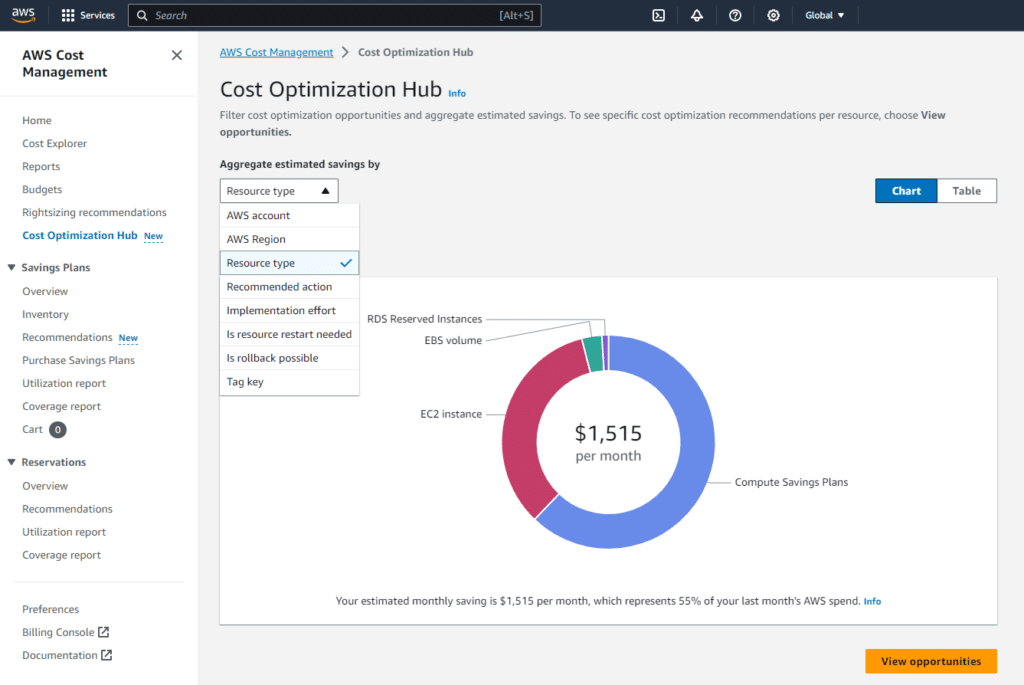
AWS Cost Optimization Hub
This dashboard unites over 18 types of cost-saving recommendations, rightsizing, idle resource deletion, and so on. AWS Cost Optimization Hub checks across all your cloud accounts into a single dashboard, so you know where the expenses are.
AWS Compute Optimizer
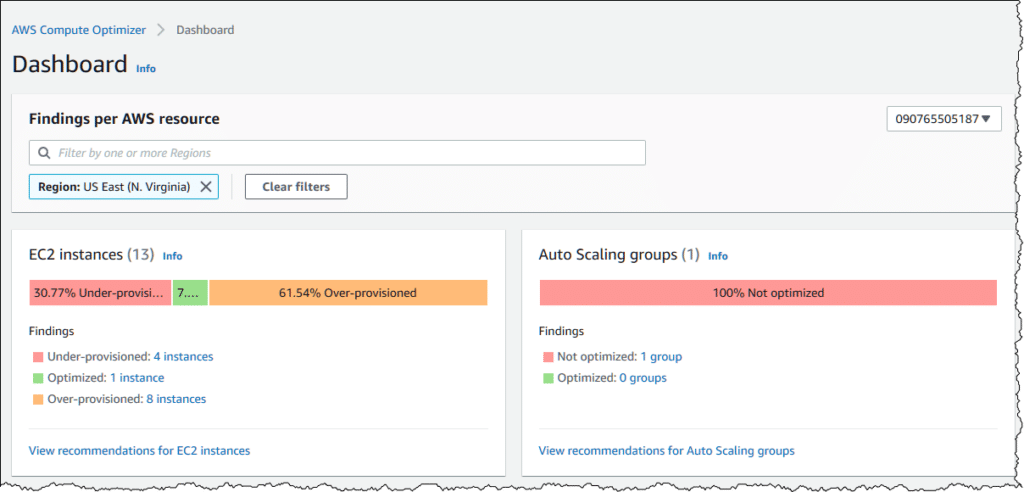
AWS Compute Optimizer uses Amazon CloudWatch and machine learning to analyse your resources and recommend optimal EC2, EBS, and Lambda configurations. You need to install an agent on your instances, but when you do, the dashboard identifies wasted resources (aka over-provisionment).
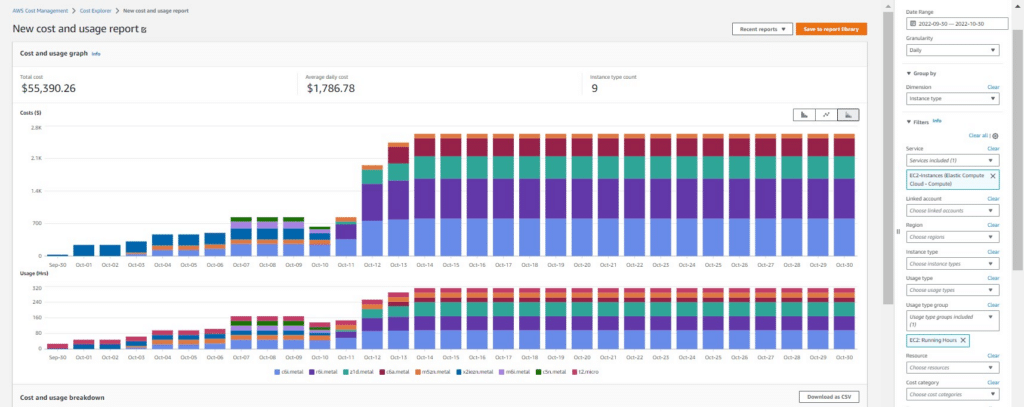
AWS Cost Explorer
With AWS Cost Explorer, you can check your historical cloud usage and forecast your future costs. It helps you manage your billing data to uncover why your costs look the way they do. You can view up to 38 months of data, checking your costs by month or day. For more precise troubleshooting, you can enable hourly and resource-level monitoring for the past 14 days.
2. FinOps Specialized Platforms
Native AWS Tools have a single flaw: They are limited to the AWS ecosystem. If you have workloads in Microsoft Azure, Google Cloud (GCP), or on-premises data centers (vSphere), native tools won’t help you consolidate those costs. These FinOps tools are ideal for complex cost allocation and governance across multiple teams or cloud providers.
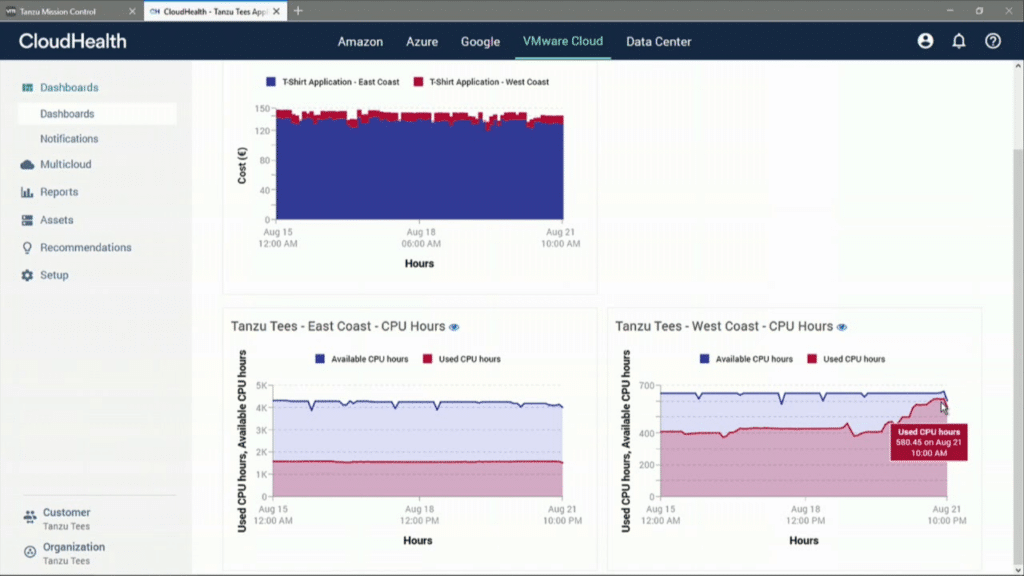
CloudHealth (by VMware)
CloudHealth is one of the most traditional tools on the market. It’s the best for complex organizational structures and focuses on governance, compliance, complex cost allocation (called Perspectives), and automation of corrective actions.
Use CloudHealth if you have a large corporation or deal with managed service providers (MSPs) that need tight control. You can also use it for chargeback/showback reporting and automation (e.g., shutting down orphaned resources via policies).
However, CloudHealth can be overkill for smaller teams, and both the interface and ingress speed are slower than those of its competitors.
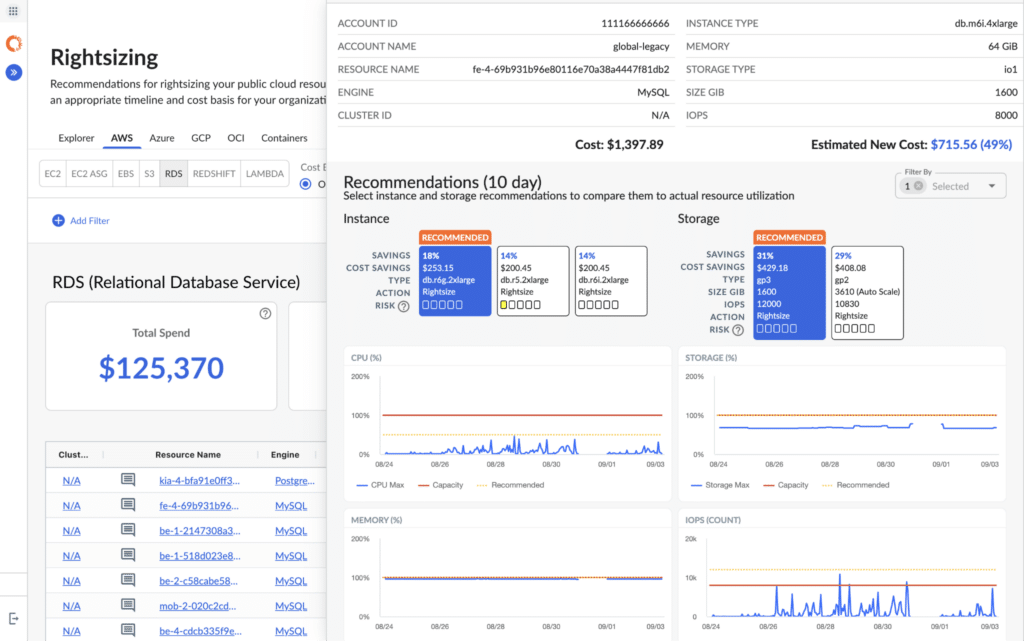
Apptio Cloudability
Cloudability (acquired by IBM) is the “Gold Standard” of FinOps culture and Business Analytics. Built for the FinOps Framework, it cuts costs by connecting cloud spending to business value. For example, it answers the question “How much does the cloud cost per transaction or per active user?”
Many analysts (Gartner, Forrester) consider Cloudability a more mature tool for FinOps. The tag mapping and the ability to normalize data from different clouds into a single taxonomy are exceptional, and the tool is excellent for bringing the Finance team closer to the Engineering team.
However, licensing costs are usually high, and the focus on direct automation is less than in CloudHealth.
Anodot
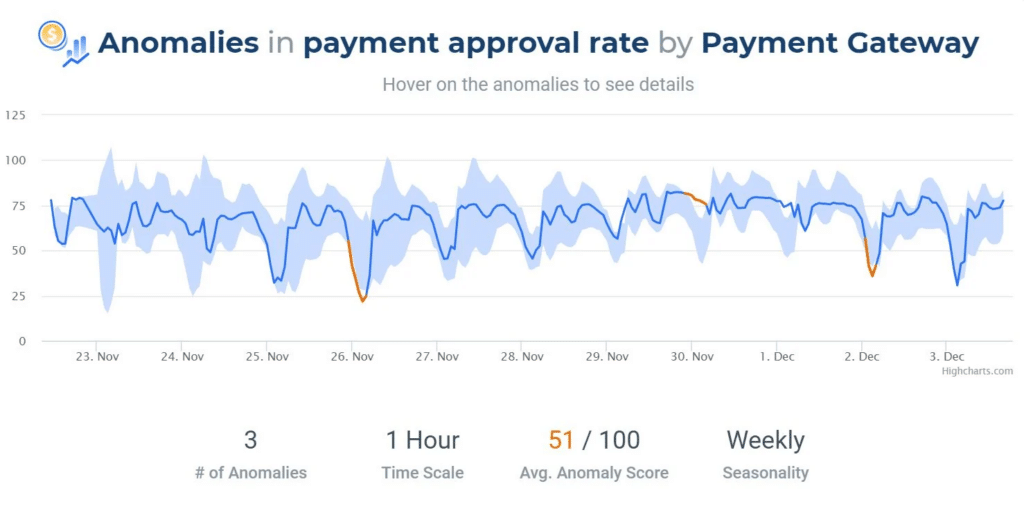
Anodot started as a Machine Learning-based Data Analytics and Artificial Intelligence platform and then applied that engine to cloud cost management. It approaches FinOps differently: it monitors cost behavior to catch waste in real time. Few tools can do the same for AWS Cost Optimization.
While CloudHealth and Cloudability rely heavily on historical reports and trends, Anodot excels at instantly alerting you if a script runs incorrectly and generates an unexpected cost spike. It learns your infrastructure’s behavior and warns you: “This is out of the ordinary for a Tuesday.”
However, long-term corporate financial planning capabilities and complex budgets are not as deep as those in Cloudability.
3. Workload and Automation (AIOps)
The following tools are leaders in AIOps. They focus on detecting underutilized or misconfigured resources and resolving them as soon as possible.
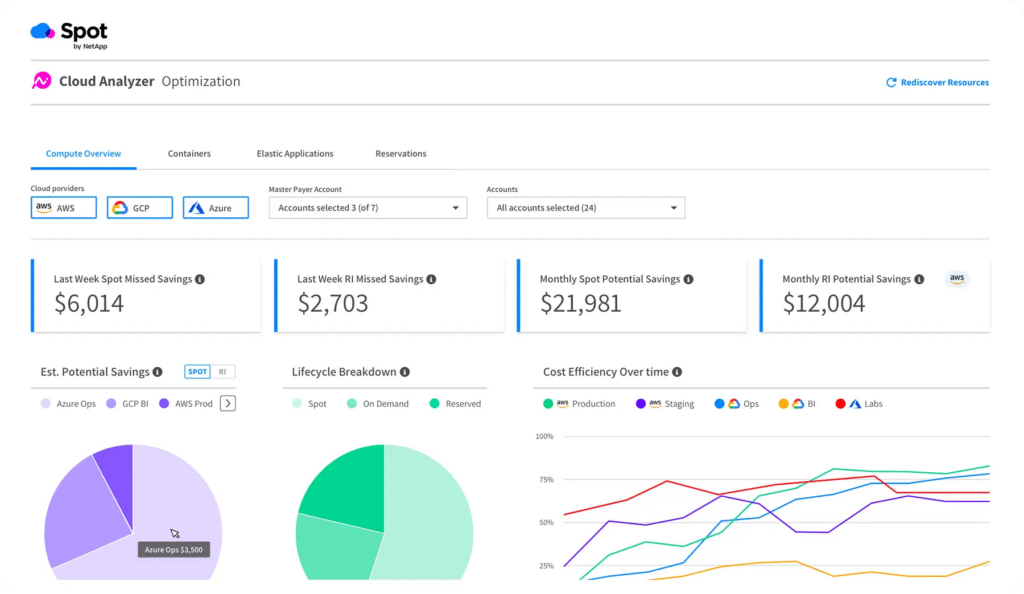
Spot.io (by NetApp)
When Spot.io predicts that a Spot instance (which is up to 90% cheaper but can be terminated) will be deallocated in the next few minutes, it starts a new instance (Spot or On-Demand) and migrates the workload before the interruption occurs.
It works very well with traditional virtual machines (ASGs, isolated instances), ECS, and Kubernetes clusters (through Ocean). It also manages Reserved Instances and Savings Plans (Eco), ensuring that you buy and sell cloud commitments efficiently.
Cast AI
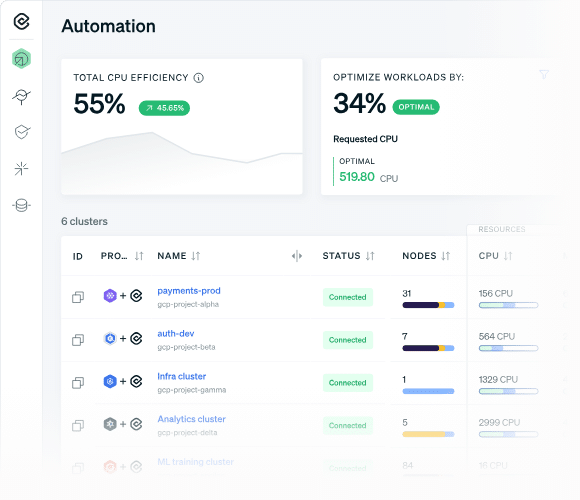
Cast AI runs as an agent within your Kubernetes (EKS, GKE, AKS, etc.) and performs rightsizing. If a Pod needs less CPU/Memory than configured, Cast AI adjusts the limits. If there are empty or underutilized nodes, Cast AI condenses the Pods into fewer machines (bin-packing) and instantly shuts down the remaining machines.
Cast AI can also decide to replace an expensive instance with a cheaper one if it perceives that the workload would benefit more, and it can also manage Spot instances.
Conclusion
Reading about AWS optimization is easy, but building a culture that actually practices it is where most companies fail. You can write all the tagging policies you want, but if your developers don’t naturally care about cloud financial awareness, the waste will always leak back in.
That is where we come in. At DistantJob, we source cloud engineers who balance technical skill with business accountability. We help companies find remote developers who look past basic resume keywords to evaluate technical fit, infrastructure communication habits, and cloud governance. Call us today!
FAQ
The quickest method to lower cloud costs is to terminate idle infrastructure. Look for unattached Amazon EBS storage volumes, unassigned static IP addresses, and idle relational database instances that teams provisioned for short-term testing and never decommissioned.
Savings Plans provides a flat discount in exchange for a committed hourly monetary spend, regardless of the instance type or region you use. Reserved Instances require a commitment to a specific instance size, operating system, and geographic region to yield a comparable discount.
If your team carelessly downsizes an instance, they will drop traffic. To avoid downtime, use rolling deployment strategies, execute changes during low-traffic windows, or use serverless resources that automatically scale resource boundaries.
S3 lifecycle policies automatically migrate data to cheaper storage tiers or delete files permanently based on time thresholds you define. For example, a policy can move database logs from standard storage to an archive tier after 30 days, automatically lowering storage costs.
AWS charges data transfer fees to cover the network infrastructure required to move data between physically separated data centers. Distributed applications that pass large amounts of uncompressed data between separate zones generate substantial charges. You can reduce these costs by co-locating tightly coupled services.