Oracle says OCI runs up to 50% cheaper than AWS, Azure, and GCP combined. That’s a marketing number, not an audited one. And as a Product Manager, Oracle ACE and Certified DevOps professional, I’ve learned to look at the metrics. So we ran an AWS vs OCI comparison through the Oracle Cloud Cost Estimator and AWS Pricing Calculator on identical workloads to see if it holds up. It did, though not always for the reason you’d expect.
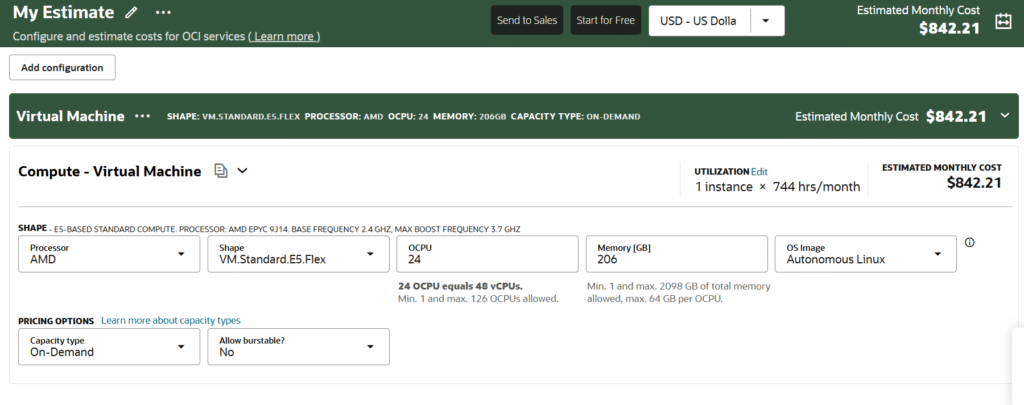
The Oracle Cloud Cost Estimator is a free tool for modeling OCI’s monthly and annual costs before you deploy anything. Run a 24 oCPU virtual machine with 206 GB of memory through it, and you get $842 a month, versus $2,409 for an equivalent AWS instance; still $1,299 even after AWS Savings Plans. Add 100 TB of egress, and OCI totals $1,582 versus $9,286 on AWS.
How to Use the Oracle Cloud Cost Estimator
The Oracle Cloud Cost Estimator (sometimes called the OCI Cost Estimator) is a free, web-based tool provided by Oracle. In my architecture assessments, I use it to model, forecast, and export the expected monthly or annual cloud spend before provisioning a single resource. It’s useful for comparing against an existing AWS or Azure bill before you commit to a migration.
1. Select Your Services
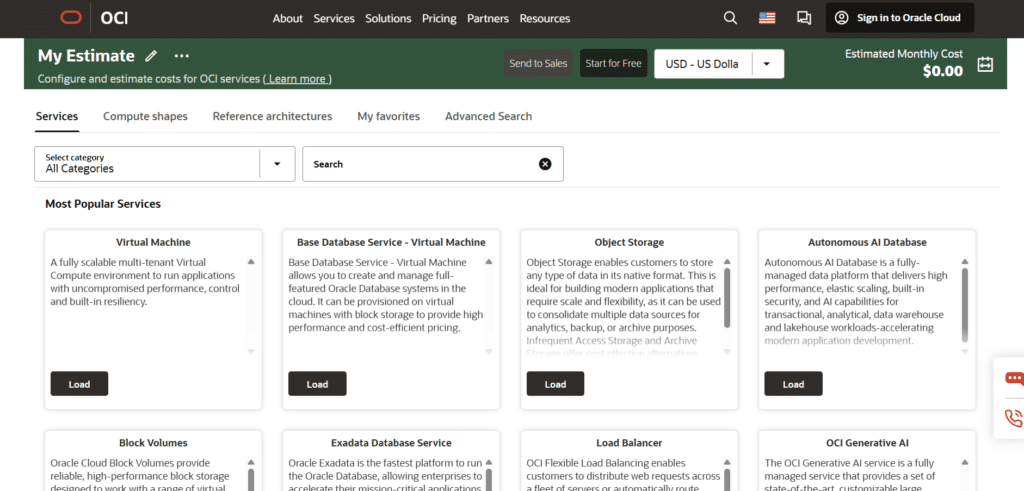
Navigate to the Oracle Cloud Cost Estimator. From the Select Category list or by using the search bar, choose the cloud service you want to deploy. For this example, we will use Virtual Machines, but you can check Base Database Services, OCI Generative AI, and many other services.
2. Configure Resource Details
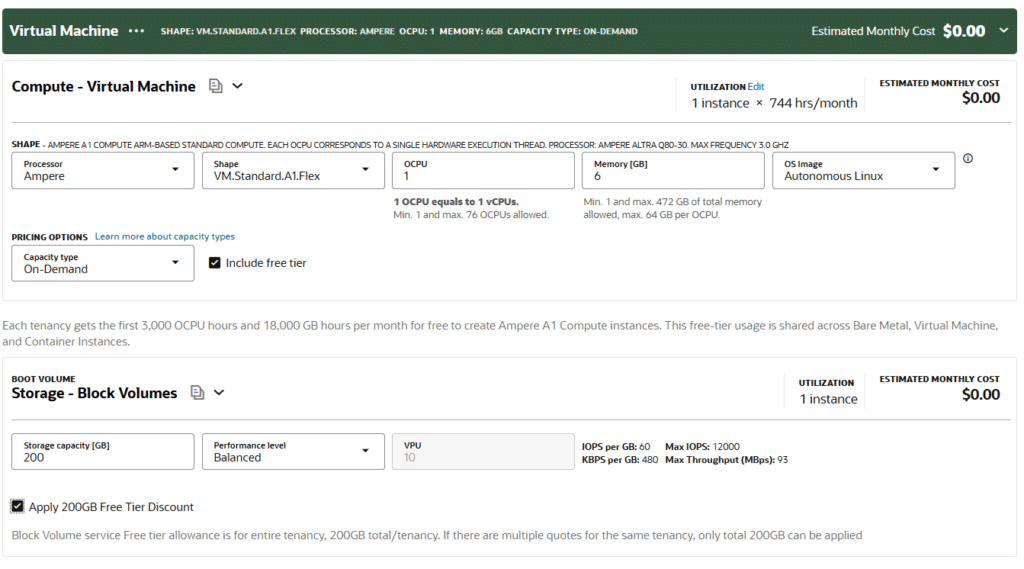
Customize your service by clicking Load to open the default template, then adjust the parameters:
- Utilization: Set the number of instances, hours per day, and days per month the service will run.
- Hardware: Select your compute processor, memory size, operating system image, and block storage capacity.
- Shapes: OCPUs, memory type, VM sizing, and OS.
- Storage: Block storage capacity and performance tiers.
3. Choose a Pricing Model
You can toggle between two primary pricing options to see how they impact your monthly bill.
On-Demand
The Oracle Cloud Cost Estimator shows the estimated on-demand monthly cost based entirely on actual usage, with no upfront commitments.
Preemptible Instances
They provide short-term compute capacity at a flat 50% discount compared to on-demand rates. Remember that these instances can be terminated without warning; ensure your workloads are stateless, checkpointable, and can easily resume from where they left off.
Capacity Reservation
You can pre-allocate compute resources in a specific availability zone for a set period. They will be available for your tenancy to consume at any time.
Is Oracle Cloud cheaper than AWS?
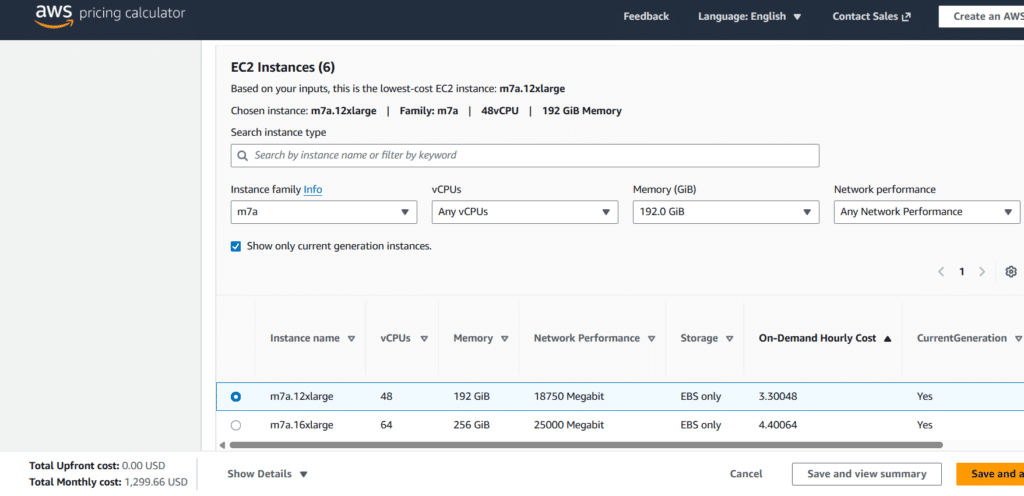
Same vCPU count, same memory, on-demand pricing, comparable hardware generation (the OCI instance runs Autonomous Linux; the AWS instance runs RHEL; both require paid licenses and are similar).
| On-demand | OCI (VM.Standard.E5.Flex) | AWS (m7a.12xlarge) |
| CPU | AMD EPYC 9J14 (4th Gen) | AMD EPYC 9R14 (4th Gen) |
| Compute | 24 OCPUs (≈48 vCPUs) | 48 vCPUs |
| Memory | 206 GB | 192 GiB (≈206 GB) |
| Price | $842.21 | $2,409.35 |
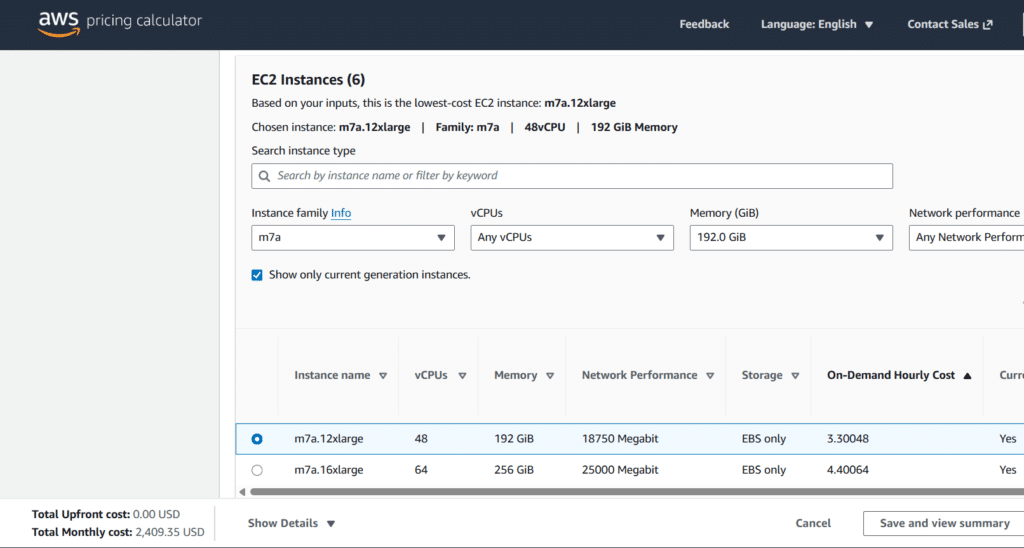
Even after applying AWS EC2 Instance Savings Plans, OCI on-demand still wins:
| OCI (VM.Standard.E5.Flex) | AWS (m7a.12xlarge) | |
| Price | $842.21 (On-Demand) | $1,299.66 (with Saving Plans) |
AWS vs Oracle Cloud in Egress Fees
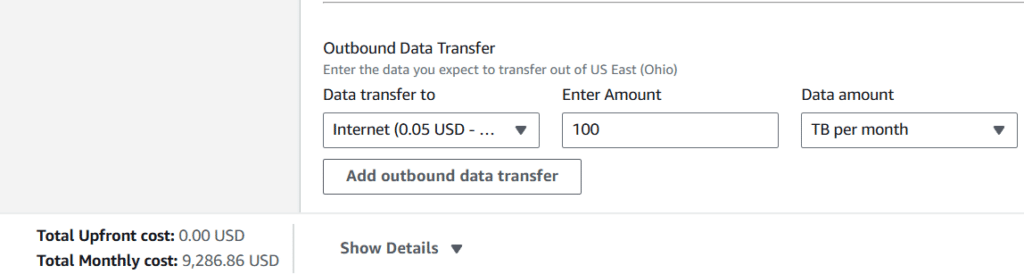
Now, assuming EC2 Instance Savings Plans, let’s assume 100 TB for Egress Fees. That’s roughly $8,000 a month added to the AWS bill from egress alone, a hidden cost that doesn’t surface until you’re already running your VM.
OCI allows 10 TB of outbound data transfer per month for free across all services and global regions. Once you exceed the 10 TB free tier, Oracle Cloud charges fees as follows:
- First 10 TB: Free
- Next 40 TB: $0.0085 per GB
- Next 100 TB: $0.0080 per GB
- Over 150 TB: $0.0070 per GB
The total cost to transfer 100 TB on OCI will be $740.00.
| 100 TB/month | OCI (VM.Standard.E5.Flex) | AWS (m7a.12xlarge) |
| Price | $1,582.21 (On-Demand) | $9,286.86 (with Saving Plans) |
What is an OCPU, and how to cut costs with it?
An OCPU (Oracle Central Processing Unit) is Oracle Cloud Infrastructure’s special Virtual CPU. Each OCPU represents a physical CPU core, executing two threads per core. While other cloud services allocate you vCPUs, compromising your performance, one oCPU equals two vCPUs (except on ARM instances).
Think of it like kitchen staff. A physical CPU core is a chef. A vCPU is like a chef cooking two dishes at once, splitting attention. One OCPU gives you a dedicated chef, no splitting required. That’s why one OCPU equals two vCPUs on most shapes (ARM instances are the exception).
When you buy 1 OCPU from Oracle, they give you a dedicated core (1 physical core). No sharing, no slowdowns.
How do OCPUs make me cut costs?
Many companies charge for software licenses based on processor cores. Since one oCPU delivers two vCPUs, you can run the same system using half the number of licenses.
One of my favorite features as a DevOps engineer is that Oracle Cloud allows you to change the number of OCPUs on a running VM. We don’t have to rebuild it from scratch. We adjust the exact amount of CPU, paying only for what we use. This is unlike traditional rightsizing, which requires downtime.
| Architecture Metric | OCPU Configuration | vCPU Configuration |
| Physical Equivalence | 1 Physical CPU Core (2 threads on x86) | 1 Single Execution Thread |
| Resource Allocation | Dedicated physical hardware core | Shared processing thread |
| Performance Profile | Predictable throughput with zero neighbors | Variable processing capability |
| Licensing Requirements | Reduces total software core licenses | Requires double the license footprint |
| Scaling Flexibility | Live core adjustments with zero downtime | Requires system restarts to scale |
When to Pair Oracle Cloud with Other Cloud Providers
You should pair Oracle Cloud with other top players when your goal is to combine OCI’s strengths with the specialized services, scale, or innovation of another cloud provider, all while avoiding vendor lock-in.
Here is when and how to pair OCI’s wider portfolio with other clouds:
1. Bare Metal Performance
OCI’s bare-metal and RDMA clustering skip virtualization overhead at a lower cost. This is useful for HPC, financial risk modeling, genomic sequencing, or real-time analytics, while keeping the front-end and storage on AWS, Azure, or GCP.
2. Integration with 6,000+ SaaS Applications
Oracle Integration Cloud has prebuilt adapters for Fusion ERP, HCM, CX, Salesforce, Workday, and ServiceNow; often faster to wire up than building point-to-point APIs in Lambda or Logic Apps.
3. Avoiding High Egress Fees
OCI Data Flow (Apache Spark) and GoldenGate let you run analytics on AWS or Azure data through a high-speed interconnect, without paying full egress to move it first.
4. Oracle Database@<Provider>
Oracle now runs its database directly inside AWS, Azure, and Google Cloud datacenters. There is Exadata inside AWS, direct integration with Microsoft identity and architecture in Azure, and direct links to Google’s ML tooling, all without a cross-cloud data pipeline.
Conclusion
The Oracle Cost Estimator is just the starting point. To decide between migrating to or adopting OCI, run your own numbers through it before committing either way. The gap between marketing claims and real instance pricing is usually where the real savings, or the real surprises, show up.
At DistantJob, we headhunt and pre-vet cloud architects and engineers specializing in OCI, AWS, and modern hybrid and multi-cloud infrastructure. We skip generic resume matching to focus entirely on technical background, delivery, remote productivity, and real architecture and cost-optimization decisions.
If you’re building or scaling a cloud team, our hiring team can help. For a look at what separates a strong cloud hire from a weak one, see our cloud engineer skills guide.
FAQ
It models your expected OCI spend before you provision anything: monthly and annual forecasts based on the exact services, instance shapes, and pricing model you select. It’s free and doesn’t require an active OCI account.
It’s a strong forecast, not a guarantee. Real bills can shift with usage spikes, storage tier changes, and support costs, but the estimator’s on-demand and reservation pricing closely match published OCI rates.
An OCPU represents a full physical core on x86 platforms, delivering two parallel processing threads. A vCPU is a single thread on a shared core. One OCPU equals roughly two vCPUs in performance, which can cut core-based software licensing costs by half.
The first 10 TB of monthly outbound transfer is free across all regions. Beyond that, OCI bills on a tiered scale starting under a cent per gigabyte, consistently cheaper than standard AWS or Azure egress pricing.
Yes. OCI’s flexible VM shapes let you change processor core counts and memory live, without the maintenance windows traditional scaling requires.
Preemptible instances suit fault-tolerant, stateless workloads (batch jobs, dev/test environments) at a 50% discount. Since the provider can reclaim them at any time, your architecture needs automated checkpointing to avoid losing work.
No, the utility is a web-accessible, public application provided for free. Teams can build, adjust, and export detailed configuration models to forecast potential operational bills without creating an active infrastructure account